Participant
October 1, 2021
Answered

Exported files come out at wrong size

  • October 1, 2021
  • 2 replies
  • 365 views

I have very specific criteria when exporting for my client. 


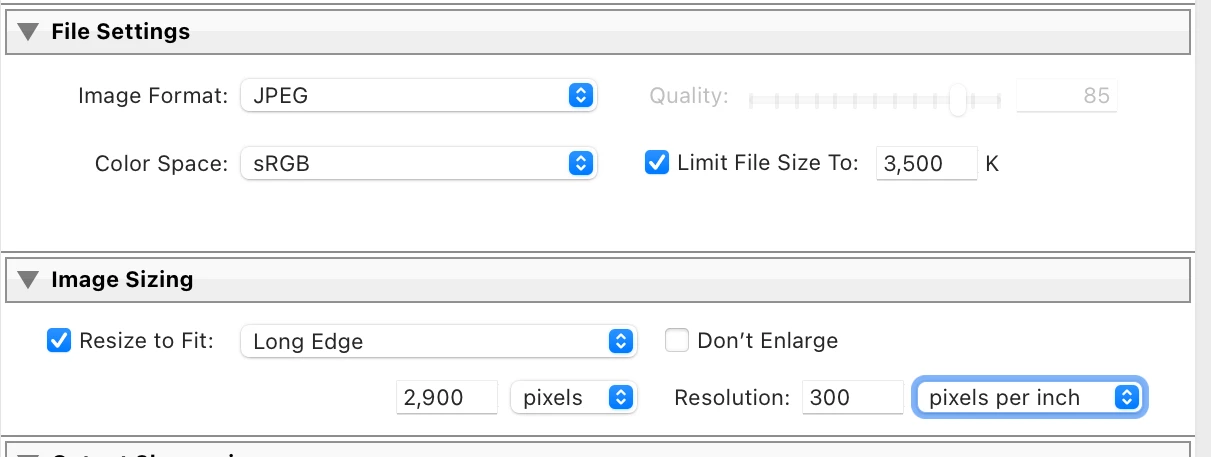
Size: 3500K and 2900px long edge. 


After exporting these files I end up with less than 1mb file which is 1500x1000. Reaching out to support completly failed and as a work around I have been given a guide on how to export. After paying Adobe for the last 7 years or so youd figure I know how to do that by now right.


So, who can help me here as tech support couldnt fix it and left our bomgar session 🙂 
This topic has been closed for replies.
Correct answer johnrellis

[This post contains formatting and embedded images that don't appear in email. View the post in your Web browser.]


"I end up with less than 1mb file which is 1500x1000."


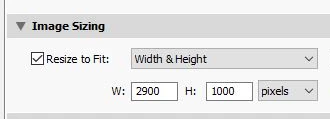
This is because you've selected the Export option Resize To Fit: Width & Height, 2900 x 1000:


That means the exported width must be less than 2900 and the exported height less than 1000. Since the photo has an aspect ration of 3:2, LR exports 1500 x 1000.


To get these criteria:


"Size: 3500K and 2900px long edge."


use these options:


2 replies

johnrellis
Legend
October 1, 2021

Moderators, please move this to Discussions.

johnrellis
johnrellisCorrect answer
Legend
October 1, 2021

[This post contains formatting and embedded images that don't appear in email. View the post in your Web browser.]


"I end up with less than 1mb file which is 1500x1000."


This is because you've selected the Export option Resize To Fit: Width & Height, 2900 x 1000:


That means the exported width must be less than 2900 and the exported height less than 1000. Since the photo has an aspect ration of 3:2, LR exports 1500 x 1000.


To get these criteria:


"Size: 3500K and 2900px long edge."


use these options:


Community Expert
October 1, 2021

The "long edge" method is fine in principle, but I have sometimes found this function unreliable in practice. Also it can be a limitation for height and width to necessarily share the same max dimension.


Another approach, more robust IMO, would have been to set Width to 2900px, AND Height to 2900px. This width limit will then naturally govern landscape images, and this height limit will naturally govern portrait images. The images are being fitted inside a square "containing box" in other words, for whatever shape or orientation of each image. This way the "box" could also be defined with different width and height limits, if appropriate.