
Participating Frequently
July 27, 2020
Answered

Exporting problem DNG -> JPEG

  • July 27, 2020
  • 3 replies
  • 3285 views

Hi,


Another problem appeared yesterday.  I have used the LrC six months - everything has worked. Now the edits are not changing to JPEG, when  exporting DNG files. I use a hp and Lightroom classic (LrC)


DNG -> JPEG


1)  I imported a RAW file   ->  converted to DNG.

2)  DNG   ->  Develop - Edited an image and   ->   File  ->export.


Page / Export One File

File naming:
I can see that
Example: rose.DNG - it is still in DNG format and not in JPEG format like earlier.


I hope you understand what I am trying to explain.  I dare not do anything to avoid messing up. I've always exported all the images in this way.


Does anyone know how to fix this problem ?


ottoelli

70 yrs
This topic has been closed for replies.
Correct answer johnrellis

[This post contains formatting and embedded images that don't appear in email. View the post in your Web browser.]


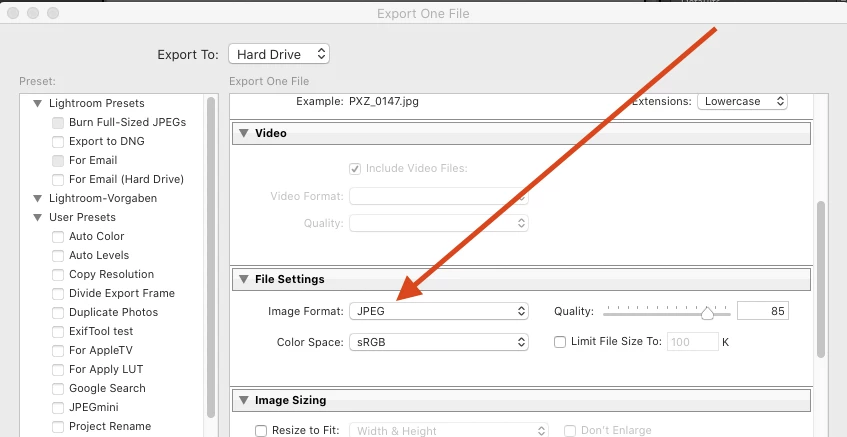
In the Export window, in File Settings, make sure that Image Format is set to JPEG (and not Original):


[Use the blue reply button under the first post to ensure replies sort properly.]


3 replies

johnrellis
Braniac
July 27, 2020

Glad it was that easy to resolve.


[Use the blue reply button under the first post to ensure replies sort properly.]

GoldingD
Braniac
July 27, 2020

When you export a photo, LrC creates a new copy in the format you choose to export to. So, you should still have that DNG file, AND a new JPEG file.


It is possible that the two files get stacked together

https://helpx.adobe.com/lightroom-classic/help/grouping-photos-stacks.html

https://laurashoe.com/2017/03/23/exporting-in-lightroom-export-location-settings/


It is also possible, based on your current sorting criteria, that the new JPEG file may be just a lot further along in the filmstrip as opposed to just next to the DNG file.


I suspect stacking first.


OttoelliAuthor
Participating Frequently
July 27, 2020

Hi davidg36166309,


Thank you kindly for your help. I really appreciate this  - I believe this will be of help.


Best regards,


ottoelli

johnrellis
johnrellisCorrect answer
Braniac
July 27, 2020

[This post contains formatting and embedded images that don't appear in email. View the post in your Web browser.]


In the Export window, in File Settings, make sure that Image Format is set to JPEG (and not Original):


[Use the blue reply button under the first post to ensure replies sort properly.]


OttoelliAuthor
Participating Frequently
July 27, 2020

Hi johnrellis,


Thank you very much for your kind help.


I checked File Settings - and you are absolutely right -

Image Format was not set to JPEG (It was Original)


Thanks again - All I can say - You make my day - I'm so happy !!!
Good night from Finland.
Best wishes,


ottoelli