
Inspiring
May 8, 2017
Answered

F Function Keys not working

  • May 8, 2017
  • 3 replies
  • 6331 views

Help.

I'm trying to use the F Function keys/short cuts on my iMac desk top. For example, in Library module I want to rename a number of photos, hit the F2 rename and the brightness on my monitor goes up.

I've checked System Preferences/Keyboard and check box the Use F1, F2 etc keys as standard function keys. But this doesn't solve the problem. Is there another configuration that I'm missing?

Using iMac 10.12; LR CC 2015.10

Any suggestions would be appreciated.
    This topic has been closed for replies.
    Correct answer LisaMReny

    Akash and Just Shoot Me.

    After digging into the System Preference a bit deeper, I found the solution to my issue..

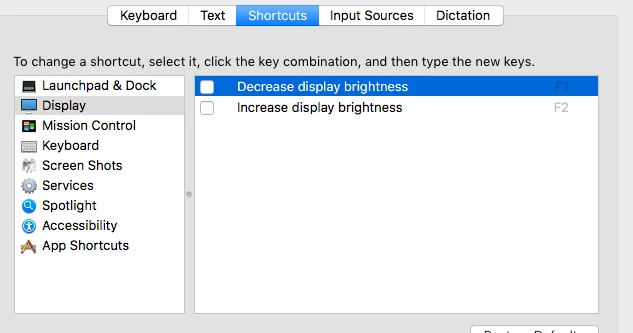
    Here is what I need to also configure to make the F1/F2 function keys work in LR.

    Make sure that on Display/Shortcuts that the two boxes are UN-checked.. And know I have working F1/F2 keys..

    So Happy!!

    3 replies

    LisaMRenyAuthorCorrect answer
    Inspiring
    May 8, 2017

    Akash and Just Shoot Me.

    After digging into the System Preference a bit deeper, I found the solution to my issue..

    Here is what I need to also configure to make the F1/F2 function keys work in LR.

    Make sure that on Display/Shortcuts that the two boxes are UN-checked.. And know I have working F1/F2 keys..

    So Happy!!

    Akash Sharma
    Legend
    May 8, 2017

    Hi LisaMReny,

    Are you using the "Fn" key to press the "F2" key on your keyboard? It will change whatever your system defaults are.

    It's possible that your system is set to use the keystrokes for increasing Brightness.

    Thanks,

    Akash

    LisaMRenyAuthor
    Inspiring
    May 8, 2017

    Akash,

    I have my iMac configured for that in OS System Preferences. Whether I use the Fn key or not my F1 and F2 keys still behave like Mac function keys (ie. brightness control) I can't get them to work as short cuts in LR. All the other Fn keys short cuts work in LR.. Go figure???

    Just Shoot Me
    Legend
    May 8, 2017

    Does the keyboard you are using have a Fn key? 99% of all Mac computers have the option set to use the F Function keys as something other than the function keys. Holding down the Fn key while hitting the F function keys turn them back into what they were originally designed to do, IE act as Function keys.

    You can change that setting in the Mac OS X System preferences.

    LisaMRenyAuthor
    Inspiring
    May 8, 2017

    Just Shoot Me,

    Yes, my keyboard has the Fn key. I have it configured for that in OS System Preferences. Whether is use the Fn key or not my F1 and F2 keys still behave like Mac function keys (ie. brightness control) I can't get them to work as short cuts in LR. All the other Fn keys short cuts work in LR.. Go figure???