Participating Frequently
February 15, 2022
Answered

Falla visualización en revelar

  • February 15, 2022
  • 5 replies
  • 2507 views

Buenas a todos.


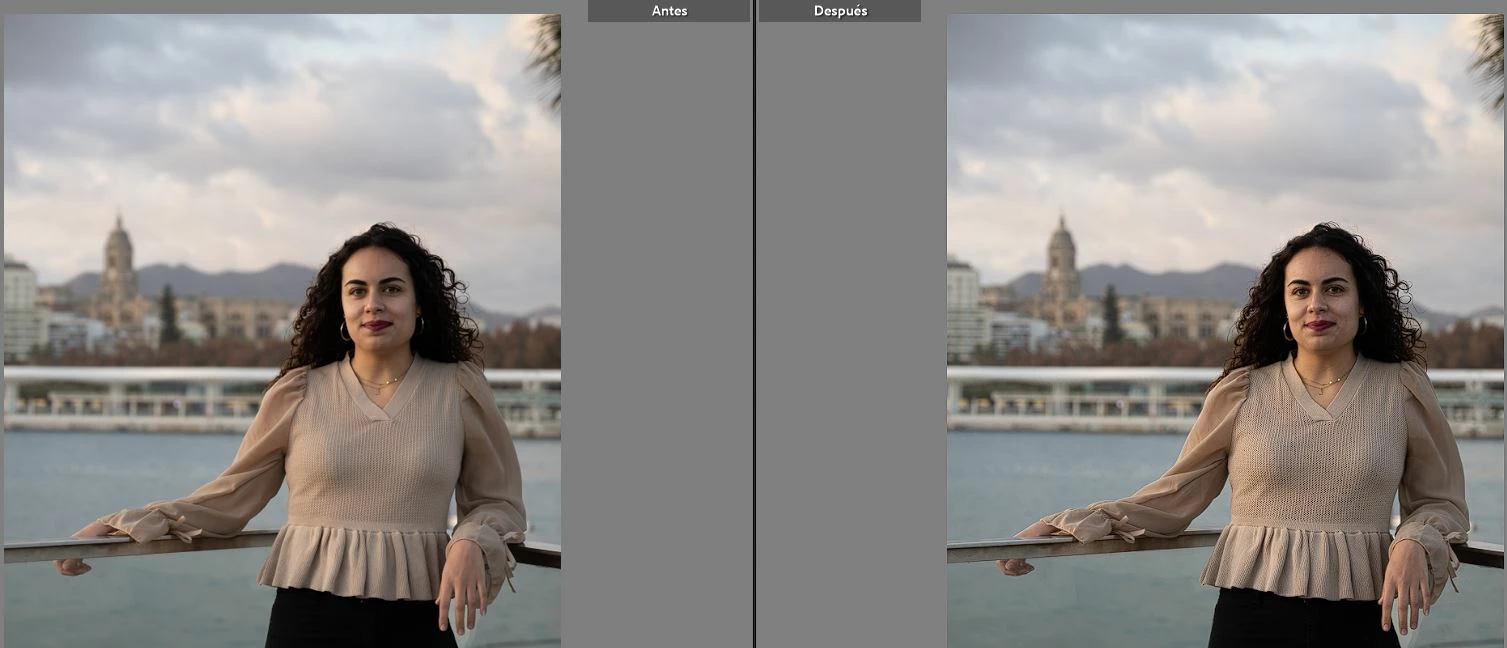
Cuando paso al modulo de Revelar la imagen se ve modificada, mientras que en Bbiblioteca se ve bien. Simplemente eso, he probado de todo.


Gracias de antemano.
 

This topic has been closed for replies.
Correct answer Todd Shaner

Are you saying the Library module and Develop module previews look different? If so try 1) closing LrC, 2) shutdown your sysetm, 3) restart your system, and 4) Import some new image files shot today with File Handling> Build Previews set to Standard. If the Library module previews and Develop module previews still look different go to menu Edit Preferences> Performance> and set 'Use Graphics Processor' to Off. Close all applications, shut down your system, restart your system and try LrC again. If they are still different follow the instructions at the below link to change your display profile to sRGB.


https://www.lightroomqueen.com/how-do-i-change-my-monitor-profile-to-check-whether-its-corrupted/


5 replies

Todd Shaner
Legend
February 20, 2022

Glad to hear your stress is relieved. Just let us know if you have further difficulty. Enjoy!

Todd Shaner
Legend
February 18, 2022

The graphics processor setting helps to speed up LrC with high-resolution 4K and 5K displays. If you're using a display like 2560 x 1440 or lower you shouldn't see a significant difference with it set to Off.

AleCH_MCFAuthor
Participating Frequently
February 20, 2022

Perfecto Todd. Tengo que mirar como configurar la tarjeta gráfica y ya está. Al menos ya puedo editar las imagenes. Asi que solucionado.

Gracias de corazón por haberme ayudado, llevaba semanas estresado sin encontrar solución. Agradecer también a @dj_paige que me puso en contacto contigo.

¡Gracias por vuestro tiempo amigos y un saludo desde Málaga! 🙂

Todd Shaner
Legend
February 17, 2022

There's no need to change your display profile to sRGB if disabling the graphics processor fixed the issue. As @dj_paige mentioned this is usually due to a graphics driver issue. So you had two issues! Try updating the graphics driver as outlined at the below article and see if the issue is fixed with 'Use Graphics Processor enabled.


https://helpx.adobe.com/x-productkb/multi/update-graphics-driver.html


AleCH_MCFAuthor
Participating Frequently
February 18, 2022

De acuerdo, mas tarde lo intento.

¿Cual es la diferencia entre tener el procesador gráfico activado o estar apagado?

Todd Shaner
Legend
February 16, 2022

In your screenshot Biblioteca y Revelar the words previsualizacion incrustada apppear. English translation is 'embedded preview.' This means you imported the image files with the Import module File Handling> Build Previews set to Embedded & Sidecar. This causes the imported image files to display the in-camera settings, which will look quite different than the LrC Develop module rendering. Change that setting to 'Standard' to use LrC's rendering in both the Library & Develop modules. Alternatively you can change the raw default setng to use your 'Camera Settings' as outlined at the below article.


https://helpx.adobe.com/il_en/lightroom-classic/help/raw-defaults.html


dj_paige
Legend
February 17, 2022

Thank you, @Todd Shaner !

dj_paige
Legend
February 15, 2022

Usually when this type of appearance mismatch between Library and Develop Module happens, you monitor profile is corrupted, and you should re-calibrate your monitor.

AleCH_MCFAuthor
Participating Frequently
February 15, 2022

El monitor está correcto, porque todo se ve bien. No es por tema de colores.

AleCH_MCFAuthor
Participating Frequently
February 16, 2022

La foto de la izquierda es la de la Biblioteca y la de la izquierda de Revelar. Con la captura de pantalla no se aprecia bien, pero hay mas contraste y ruido 


y la de la derecha de Revelar* (me he equivocado)
