Participant
June 27, 2017
Answered

File renaming panel on import has disappeared

  • June 27, 2017
  • 2 replies
  • 3501 views

I am running lightroom 6.  I've used earlier versions of lightroom before and loved the file renaming panel.  I cannot find it in lightroom 6.   how can I get it back.  I like to rename my dng based on date and event when i import to my computer
    This topic has been closed for replies.
    Correct answer Mohit Goyal

    Hi nicolel,

    Please reset Lightroom preferences back to defaults and check if that helps.

    Preference file and other file locations | Lightroom CC and 6

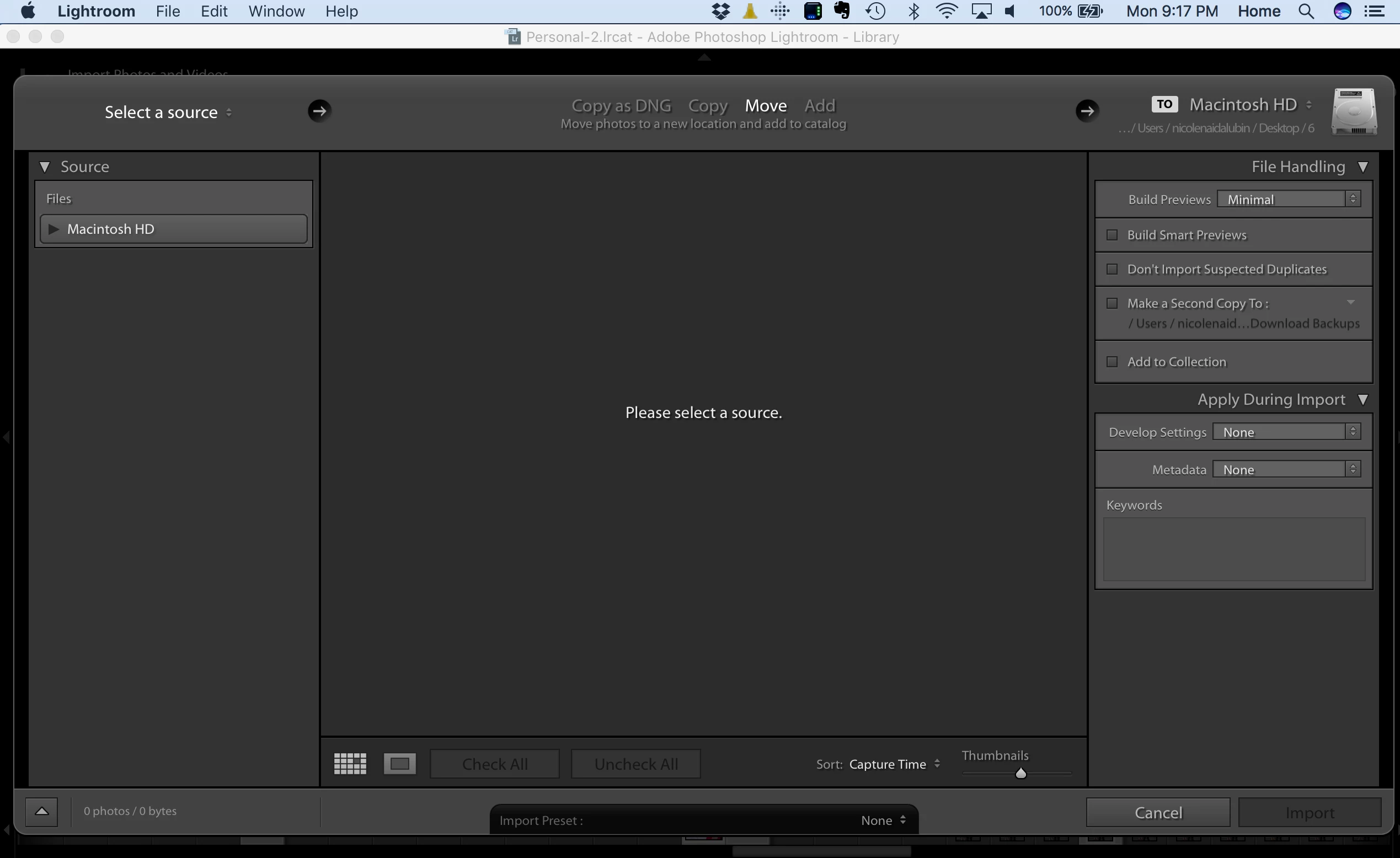
    File renaming only doesn't show up when you select the Add on the import window.

    Regards,

    Mohit

    2 replies

    Bob Somrak
    Legend
    April 20, 2020

    kwheath

    If you are using ADD, thats the only two panels you get.

    M4 Pro Mac Mini. 48GB
    Participating Frequently
    April 20, 2020

    Thanks everyone. I've deleted preferences and restarted, even reinstalled my version. 


    So Bob - it sounds like they removed this feature then. This was such a nice feature in the versions I had previously as it essentially renamed all the files to a standard filename and created folders. I am assuming it will now import to folders by date, but just keep the legacy filename.


    Let me know if I'm missing something.


    Appreciate the collaboration.


    dj_paige
    Legend
    April 20, 2020

    "So Bob - it sounds like they removed this feature then."


    They did not remove this feature. It is there for COPY and MOVE and COPY as DNG. It was never present for ADD.

    Mohit Goyal
    Community Manager
    Mohit GoyalCommunity ManagerCorrect answer
    Community Manager
    June 27, 2017

    Hi nicolel,

    Please reset Lightroom preferences back to defaults and check if that helps.

    Preference file and other file locations | Lightroom CC and 6

    File renaming only doesn't show up when you select the Add on the import window.

    Regards,

    Mohit

    Participant
    September 4, 2017

    I have the same problem, but don't understand specifically how to reset Lightroom preferences back to defaults.  Is it referring to this Presets tab in the Preferences dialog box?  If so, which one?

    johnrellis
    Legend
    September 4, 2017

    Before resetting your preferences:

    1. In the Import window, make sure you have Copy or Move selected:

    2. In the Import window, right-click on the first panel heading that shows in the right column:

    Then click Show All. The File Renaming panel should now appear.