
Participant
January 24, 2018
Answered

File size misreading

  • January 24, 2018
  • 2 replies
  • 411 views

I export a large file to a limited file out of Lightroom with no problem. I limit the file size to less than 2.9 mb and get files windows reports are under 2.9 mb. However I am getting server 500 errors as if I am uploading large files. I opened one of the 2 meg files in photoshop and photoshop reports it is a 57 meg file. Not 2 megs. Is this some kind of metadata bug? It is actually a 2 meg file from the upload speed. But I suspect my server is being told that erroneous number by metadata. Dead in the water in my business because of this and not very happy with Adobe right now.
    This topic has been closed for replies.
    Correct answer johnrellis

    I opened one of the 2 meg files in photoshop and photoshop reports it is a 57 meg file.

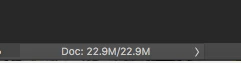
    You're probably looking at a number in Photoshop that is the number of bytes for the uncompressed photo in memory, not the size of the JPEG file on disk (which is compressed).  For example, a sample JPEG file is 2.5 MBytes on disk, while Photoshop shows the following for Document Sizes in the lower left:

    "22.9M" is the number of bytes the photo uses in memory while being edited by Photoshop.  The photo is 3264 x 2448 pixel, with 3 bytes per pixel (1 byte per color channel), which is 23,970,816 bytes. Evidently, Photoshop uses the old-fashioned "megabyte" units, where M = 1024 * 1024, so 23,970,816 = 22.9M.

    2 replies

    elie_dinur
    Participating Frequently
    January 24, 2018

    Don't confuse jpg compression and image resolution. The server has to decompress the jpg before reading it into memory and a 57 MB uncompressed size indicates that it is a high resolution 20 Megapixel image (around 3600x5400), probably still at the camera's native resolution and enough to choke the server. Moreover, even on a 4K monitor any browser would have to downscale it. Do the job yourself in LR; downsizing to something more web-friendly, like 2000x3000, and applying Output Sharpening when exporting the jpg (which will then be of better quality because it won't have to be compressed so much).

    johnrellis
    johnrellisCorrect answer
    Legend
    January 24, 2018

    I opened one of the 2 meg files in photoshop and photoshop reports it is a 57 meg file.

    You're probably looking at a number in Photoshop that is the number of bytes for the uncompressed photo in memory, not the size of the JPEG file on disk (which is compressed).  For example, a sample JPEG file is 2.5 MBytes on disk, while Photoshop shows the following for Document Sizes in the lower left:

    "22.9M" is the number of bytes the photo uses in memory while being edited by Photoshop.  The photo is 3264 x 2448 pixel, with 3 bytes per pixel (1 byte per color channel), which is 23,970,816 bytes. Evidently, Photoshop uses the old-fashioned "megabyte" units, where M = 1024 * 1024, so 23,970,816 = 22.9M.