
Finding master photos with virtual copies
I am currently working on removing a significant number of unneeded photos from my catalog. I have the set of photos that I want to remove, but when I select "Remove Photos" I am getting an confirmation dialog with information that I want to respond to, but can't figure out how. Below you can see the dialog box.
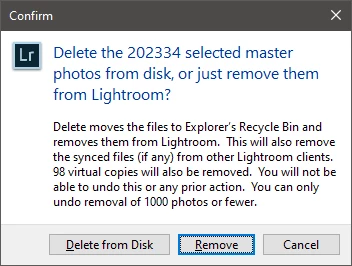
The part that I need to deal with is the 98 virtual copies that will also be removed. My collection of photos to remove includes about 60 virtual copies. Those are easy to deal with since I can remove them from my working collection and then just not include them in the delete action. My problem is the other 30 or so images. More than likely these are images where the copy ended up being the one I used (like a B&W headshot, where the original is in color), but I can't find any way to see those photos. Does anyone know I could accomplish any of the following in lightroom without having to manually go through 200k master photos I am trying to delete or the 2k virtual photos I have in my catalog?
- See a list of only master photos that have virtual copies?
- Go from a list of virtual copies to a related list of master photos?
- Some other way of removing the 30 master photos that have associated virtual copies out of a list of 200k photos.
- This is a real reach, but I am also comfortable working in SQL if anyone has any ideas for working on the catalog DB itself
Also, congratulations on LR trolling me by prompting me with information that it has clearly collected but is unwilling to give me! It would be super awesome if I had a filter option or a metadata field (hasCopy).
 AdChoices