
Inspiring
November 16, 2018
Answered

Flagging Filter

  • November 16, 2018
  • 2 replies
  • 1024 views

Hi all, hope you can help with this. Never come across it before. In Library (grid), Library filter is set to None. When I select Filter: Flagged (bottom right), it goes to Text and shows all those images I searched for in the last session. Furthermore, even though Flagged is activated all images are shown and not just those which are flagged.  
This topic has been closed for replies.
Correct answer cmgap

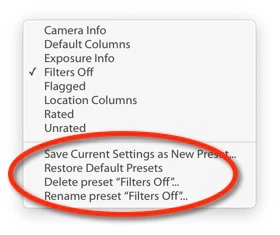
Have you tried to clear the filter by resetting?

2 replies

cmgap
Community Expert
cmgapCommunity ExpertCorrect answer
Community Expert
November 16, 2018

Have you tried to clear the filter by resetting?

RobCanisAuthor
Inspiring
November 16, 2018

Genius! Something so simple. Thank you very much, indeed.

cmgap
Community Expert
Community Expert
November 16, 2018

YW Rob. Thanks for letting us know that clearing the filter worked.

99jon
Legend
November 16, 2018

Are you using LR Classic or LR6? When you click the pull-down menu and choose rating the stars should appear. You can click the stars on the info bar e.g. one star & higher, two stars and higher or stars equal etc. That creates your custom filter.

The filter will be applied to the folder or collection shown to the left of the info bar.

If you want to filter the entire catalog start by choosing All Photographs in the Catalog tab.

When finished change from custom filter to filters off.

RobCanisAuthor
Inspiring
November 16, 2018

Hi. I'm using Classic. To which pull-down menu are you referring? I don't use stars, only flags. If I go into Attribute and select flag, there's no problem, it's only when I use the option in the bottom right.

RobCanisAuthor
Inspiring
November 16, 2018

See image below - highlighted in red.

You can choose flags or star ratings.

Or press the backslash key and use the top filter above the thumbnails.


Yes, that's the bit I am referring to. if I choose Flagged it overrides the command, goes to Text and shows all those images I searched for many sessions previous.