
Participant
September 19, 2024
Answered

Folder in Lightroom Classic Split Into Two

  • September 19, 2024
  • 3 replies
  • 532 views

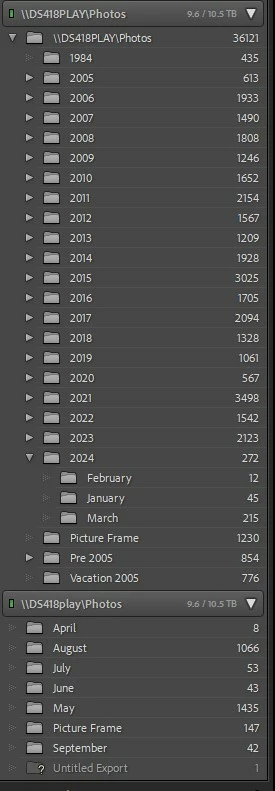
In March I got a new computer.  All files were located on my NAS so the installation of LightroomCC and transfer of the catalog went very smoothly.  I've alwasy imported my photos to the NAS with path NAS\Photos\Year\Month.  I've noticed now in the folders section when looking at  the library, I now have the NAS\Photos folder listed twice.  The second one starts in April of this year which is when I got the new computer.  How do I get rid of this second listing and get the April - all future years and months to display under the folder all other photos are in?  See attached picture.


This topic has been closed for replies.
Correct answer dj_paige

Right click on the one of the bottom folders (that don't show a year parent folder) and select "Show Parent Folder"

3 replies

DdeGannes
Community Expert
Community Expert
September 19, 2024

This is due to a capitalization issue, Original folder DWS418PLAY\photos new folder DWS418play\photos. 
Post details of your OS. I do not use a NAS but another user may offer advice on correcting.


Regards, Denis: iMac 27” mid-2015, macOS 11.7.10 Big Sur; 2TB SSD, 24 GB Ram, GPU 2 GB; LrC 12.5,; Lr 6.5, PS 24.7,; ACR 15.5,; (also Laptop Win 11, ver 24H2, LrC 15.0.1, PS 27.0; ) Camera Oly OM-D E-M1.
Participant
September 19, 2024

Thanks.  It's Windows 11.  I guess lightroom didn't care about capitalization previously - I upgraded to Lr classic from 6 at the same time I got the new PC.  Another question is that even though the photos were imported into the \\DS418play\Photos\2024\months, the year 2024 isn't listed as the parent directory of the months.  2024 isn't listed at all.  The files are certainly located in that path.


AxelMatt
Community Expert
Community Expert
September 19, 2024

As far as I see in your screenshot is the the name of the NAS is different.Since April the letters are written in lowercase. Lightroom and Windows are case sensitiv. Check the name of the NAS in Windows which is the right now.


To cleanup you can move the appropriate folder in Lightroom under the NAS with the actual name.


My System: Intel i7-8700K - 64GB RAM - NVidia Geforce RTX 3060 - Windows 11 Pro 25H2 -- LR-Classic 15 - Photoshop 27 - Nik Collection 8 - PureRAW 5 - Topaz Photo
dj_paige
Legend
September 19, 2024
Participant
September 19, 2024

Thanks.  I guess lighroom previously didn't care.  I'm also confused on why the new folders aren't under the year 2024 subdirectory (the files are in the 2024\month directory).  They were certainly imported that way, but they just end up under photos directory not under the 2024 subdirectory.


dj_paige
dj_paigeCorrect answer
Legend
September 19, 2024

Right click on the one of the bottom folders (that don't show a year parent folder) and select "Show Parent Folder"