
Participant
April 29, 2018
Answered

Folders missing following transition from a Mac to a PC

  • April 29, 2018
  • 2 replies
  • 470 views

Hi,

Very strange situation that I cant seem to sort.

I have moved my lightroom library from external drives onto another system with the same file structure.

All of my photos from 2015-2018 are fine. 2014 have all gone missing. The folder structure in lightroom is missing.

The photos are still in collections and show up.

It gives me the option to manually relink each photo but cant find the neighbouring photos.
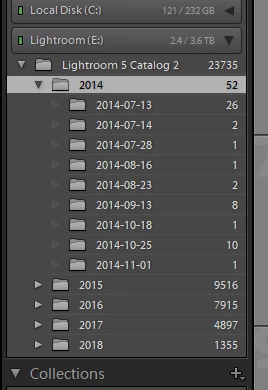
I cant seem to work out why its done it. It may not have happened as part of the move as I cant recall looking at them recently.

It seems strange all of the other folders are fine.

Any ideas?

    This topic has been closed for replies.
    Correct answer dj_paige

    Repeating

    If the photos appear in the Lightroom Library module, then you can right-click on them and select Go to Folder in Library to see the folder they are stored in. From there, reconnecting should be easy.

    2 replies

    JohanElzenga
    Community Expert
    Community Expert
    April 30, 2018

    Your screenshot shows only 52 photos for the entire year 2014, while in the next year you have 9516 photos. Did you really shoot so few photos that first year? If not, perhaps some 2014 subfolders are misplaced. Check the other year parent folders.

    -- Johan W. Elzenga
    Participant
    April 30, 2018

    Hi.

    No i took about 9k in 2014. All the photos are in the correct directory in the lightroom folder in windows explorer they just aren’t showing up down the side

    they still all show up in the library but are all missing. I can manually relink them idivida but it doesnt auto find

    dj_paige
    dj_paigeCorrect answer
    Legend
    April 30, 2018

    Repeating

    If the photos appear in the Lightroom Library module, then you can right-click on them and select Go to Folder in Library to see the folder they are stored in. From there, reconnecting should be easy.

    dj_paige
    Legend
    April 29, 2018

    I don't see any ? icons on your folders, the screen capture you show does not indicate any "missing folder" problems.

    Participant
    April 30, 2018

    That is the problem. The photos are still all in the library tab. I can manually relink all 9000 but it doesn’t auto find them. For some reason the folder isn’t showing up on the left hand side on the bit I screenshoted.

    dj_paige
    Legend
    April 30, 2018

    If the photos appear in the Lightroom Library module, then you can right-click on them and select Go to Folder in Library to see the folder they are stored in. From there, reconnecting should be easy.