
Inspiring
April 8, 2018
Beantwortet

Fujifilm Calibration Profiles Missing

  • April 8, 2018
  • 4 Antworten
  • 18012 Ansichten

I just "upgraded" my LR Classic and now there is no Fujifilm profiles to be found in the Calibration tab. Did Adobe get rid of camera profiles when they decided to give us these new, mediocre profiles? Nothing can replace Fujifilms profiles. Is there for Adobe to put it back in? Is there something I can do to re-enable the profiles? If not I have to figure out how to roll back my update...
Dieses Thema wurde für Antworten geschlossen.
Beste Antwort von JP Hess

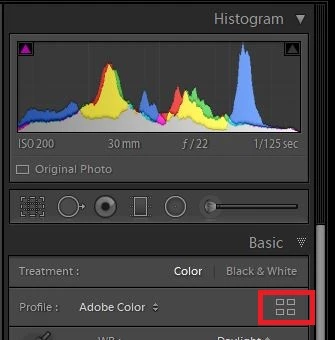
The profiles have been moved to the basic panel. If you click on the highlighted icon, you will see a number of different categories, and you are Fuji profiles will be in one of the sections.

4 Antworten

Participant
June 28, 2024

2024. Sem perfil da Fujifilme em nem locar no Lr. 
Tenho uma Fujifilme XT30 Mark 2 e preciso muito do perfil para corrigir minha lente. 23mm 2.0. da Fujifilme

BCbearAutor
Inspiring
April 8, 2018

Awesome! Thank you very much John and Jim.

Participant
October 23, 2019

None of this replies answer to the original question.

The Camera profiles belong to the Lens Correction section.

And the Fuji profiles are missing there. Because they only show up when you use RAW format.

When you shootin JPG the profiles are not to bessen, as mR.Hess mentioned in anothe treat. (Thanks !)


Participant
October 24, 2024

Thank you. I was wondering why I couldn't find them and your post was a super reminder. 

JP Hess
JP HessAntwort
Inspiring
April 8, 2018

The profiles have been moved to the basic panel. If you click on the highlighted icon, you will see a number of different categories, and you are Fuji profiles will be in one of the sections.

Participant
April 22, 2018

There are a lot of profile options for B&W and Color editing in the 'Basic' panel, but I can't see anything Fuji specific that used to appear in the 'Calibration' panel - ie: classic chrome..?

john beardsworth
Community Expert
Community Expert
April 22, 2018

Look at the Camera Matching group.

john beardsworth
Community Expert
Community Expert
April 8, 2018

They are now in the Basic panel.