
Inspiring
December 19, 2024
Question

generative AI healing has stopped working in LRc and PS. Why?

  • December 19, 2024
  • 3 replies
  • 1876 views

14.1 release 17.7cr

It was working, I use it most days. 
There have been updates from adobe but I have no date info as I auto update.

Basic steps:
use a healing tool  (or any AI feature in PS) and after the usual AI timer a vauge message appears saying AI isnt working and it gives no reason. Here is the message:
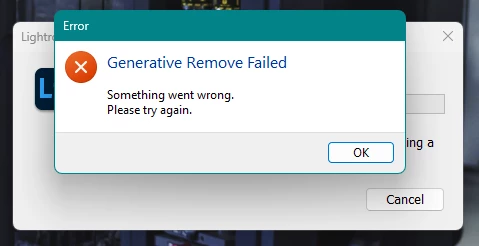
 

The issue is that I have learned to rely on this and now it has failed. I very much hope Adobe can get this one sorted quickly please!

I have a great internet connection between 200MBps and 1.3Gbps (depending what room Im working from). Previously it worked on this connection and far weeaker ones in cafes so I dont suspect this to be the issue. 

Lightroom Classic version: 14.1 [ 202412062302-d2b56666 ]
License: Creative Cloud
Language setting: en
Operating system: Windows 11 - Business Edition
Version: 11.0.26100
Application architecture: x64
System architecture: x64
Logical processor count: 12
Processor speed: 2.2GHz
SqLite Version: 3.36.0
CPU Utilisation: 4.0%
Power Source: Plugged In
Built-in memory: 16118.1 MB
Dedicated GPU memory used by Lightroom: 709.9MB / 4007.0MB (17%)
Real memory available to Lightroom: 16118.1 MB
Real memory used by Lightroom: 1503.0 MB (9.3%)
Virtual memory used by Lightroom: 3280.5 MB
GDI objects count: 1036
USER objects count: 3702
Process handles count: 3702
Memory cache size: 566.3MB
Internal Camera Raw version: 17.1 [ 2098 ]
Maximum thread count used by Camera Raw: 5
Camera Raw SIMD optimization: SSE2,AVX,AVX2
Camera Raw virtual memory: 462MB / 8059MB (5%)
Camera Raw real memory: -3216MB / 16118MB (-20%)


This topic has been closed for replies.

3 replies

johnrellis
Legend
December 19, 2024

"Generative Remove Failed. Something went wrong. Please try again."


As a rule, LR's error messages are notoriously uninformative, but the the messages for Generative Remove are useless.  The translation of that error message in TranslatedStrings is:

"$$$/Clio/StatusCode/HTTP/UncategorizedHTTPError=Something went wrong.^nPlease try again."

So "UncategorizedHTTPError" indicates some network problem. Sometimes firewalls and anti-malware / anti-virus utilities incorrectly block some network requests from LR. Try these troubleshooting steps:

- Temporarily disable all the firewall / anti-malware on your computer. If that solves the problem, then add a specific exclusion for LR to the firewall's rules.

- Connect to another network, preferably one serviced by a different ISP. E.g. a Wifi connection of a neighbor, a coffee shop, work, or your phone's hotspot. Sometimes the routers in these networks block LR's requests, especially in authoritarian countries like China.

To help others, please let us know which of these work and which don't.

Inspiring
December 19, 2024

Thanks, I will try connecting to another network again although I have already tried in one cafe and it was the same.

I can't find a means to turn off the firewall. It seems to be macafee/defender combined. Its what came with the computer.  I checked through the allowed and blocked list and adobe was all over the allwoed list. Blocked list was empty. 

GoldingD
Legend
December 20, 2024

Ive also just tested on another network (phone hot spot on 5G) and this isn't working either. That used to work.

Im doing all I can to look for outside causes but not finding any.
Do Adobe ever come in here to help?


Contact Adobe. This via a Chat. Before doing so, prepare your notes and information ahead of time as to be more efficient in communicating. Your info that you have posted in your Discussion is a start for the description, and probably have a copy of your LrC /Help/System Info/ as a text document on hand, so that you can paste or attach that into the chat.


To accomplish the Chat, bring up an Adobe webpage, and click on the Chat button. (see image below) This will start a Chat. At first the Chat will be with a chatbot, Typing Agent” into the chat text field will bypass the initial chatbot. If an agent does not enter the chat then be assertive in requesting an actual Adobe Tech join in the chat.


In the Chat include (as mentioned above) a description of the issue, and probably your System Info. And include a link to your discussion.


You may want to ask for a phone call.


And please keep notes so that you can share them in your post for others to see.


For example, bring up:

https://helpx.adobe.com/contact.html


and click on the Chat button, typically found in bottom right corner


GoldingD
Legend
December 19, 2024
Operating system: Windows 11 - Business Edition
Version: 11.0.26100

'So you upgraded at some point to Windiws 24H2, was that well before this issue showed up?

Inspiring
December 19, 2024

Thanks, I dont even know what that is or when the update occured as windows updates are set to auto.
Id be prepared to investigate if you think it is a problem?

GoldingD
Legend
December 20, 2024

"but I have no date info as I auto update."

"windows updates are set to auto."


Many of us under no circumstance allow the OS or the various Apps to just willy-nilly auto update. We do not trust the software developers to not foul up. Not for OS, not for Programs, and not for firmware


Many of us wait several days if not a couple of weeks, for any issues to appear for other users, and/or in discussions on blog and info sites.  This very Adobe Lightroom Classic community for example, where you can see that around LrC v13 the Sync to Cloud got very fouled up.


That Windows upgrade to 24H2, some very specific computers have had issues, so bad that Windows pulled the upgrade back for computers with specific hardware attached.


some examples:


Not that the Windows update is your issue. I asked to see if you had updated just before your issues showed up as to see what if????


I have in fact an existing discussion about 24H2, to see if anyone has an ussue. So far, no:


You may want to consider not trusting these programmers.


Inspiring
December 19, 2024

Update:
I tried rolling back LRc to the last version and it made no difference to this issue.