Participant
Oct 15, 2018 1:17 PM UTC
Answered

Getting photos out of Lightroom with GPS Metadata maintained

Hello, I have searched all over and con't figure this issue out.

I have a group of photos shot in 16x9 spect ratio, with the gps metadata attached to these photos. I need to batch crop them down to 4x3, after I do that, and try and export the photos out of Lightroom, all of the GPS data is gone.

Thanks for any help, I'm sure it's an easy fix, but I'm pulling my hair out over this!

This topic is closed to new replies. Start a new post to keep the conversation going.
99jon
99jonCorrect answer
Legend
Oct 15, 2018 2:00 PM UTC

yes, the coordinates are there


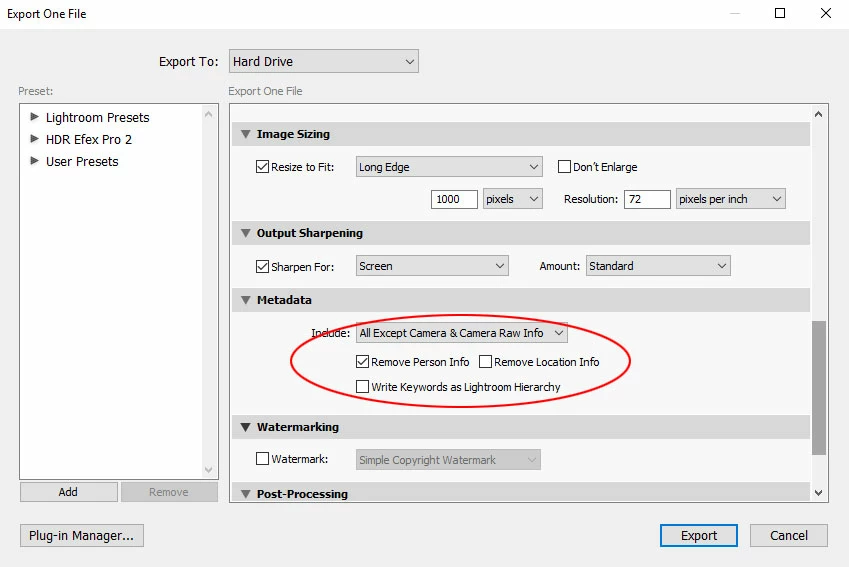
If the metadata is present in the original it should also be present in the VC. When you export a jpeg ensure exclude location is not checked in the export dialog (see image below)

It should work with any of the “All” choices

8 replies

99jon
Legend
Oct 15, 2018 1:20 PM UTC

Try making virtual copies and crop the VC's which will have the original metadata. When exporting you can choose to include or exclude location data.

Translate
slk3rdAuthor
Participant
Oct 15, 2018 1:22 PM UTC

I'm sorry for being an idiot, but how do you make virtual copies?

Translate
99jon
Legend
Oct 15, 2018 1:25 PM UTC

Select a batch of thumbnails in Library grid

From the menu choose:

Photo >> Create Virtual Copies

(Optionally) while all the VC’s are selected create a collection or quick collection

Crop as required and export the collection as new files.

Translate