


- Home
- Lightroom Classic
- Discussions
- Getting "mfc140u.dll is either not designed..." er...
- Getting "mfc140u.dll is either not designed..." er...
Getting "mfc140u.dll is either not designed..." error message

Copy link to clipboard
Copied
Has anyone else gotten the

error message?
This came up today for the first time. I've uninstalled Lightroom Classic and re-installed it twice.
I ran Microsoft's SFC utility, but that came out clean.
I read on one post this type of error may be due to a recent Window's update.
Any ideas?
Thanks!


 16
Replies
16
16
Replies
16


Copy link to clipboard
Copied
Just using google on that. And as you stated perhaps an Windows update that went south.
for example: https://appuals.com/bad-image-is-either-not-designed-to-run-on-windows-or-it-contains-an-error/
or perhaps: https://answers.microsoft.com/en-us/windows/forum/all/msvcp110dll-file-not-working-need-help/aa09ed8...
Copy link to clipboard
Copied
I finally got it resolved by replacing the version of mfc140u.dll I had with a version that I downloaded from www.sts-tutorial.com.
I did it with a bit of trepidation with fear that I was also downloading some malware along with it. If the Internet suddenly goes down in the next week, it might have been me.

Copy link to clipboard
Copied
I have the same issue after upgrading to Lightroom Classic 9.2. Reverting back to 9.1 was OK. In your case, have you had further problems after replacing mfc140u.dll ? I'm a little reluctant to do it for fear of creating even more problems after.
Copy link to clipboard
Copied
I haven't had any trouble so far.

Copy link to clipboard
Copied
For the folks needing to replace an MFC DLL, I would recommend downloading the install package directly from Microsoft.
https://www.microsoft.com/en-ie/download/details.aspx?id=48145

Copy link to clipboard
Copied
I am having the same error. I have tried both of the methods here with no luck. I did have snags on my windows updates and had to force them but no luck after that. If anyone has any other methods that may fix this issue I would love to hear it.

Copy link to clipboard
Copied
This worked for me, downloading both available files. Thank you!

Copy link to clipboard
Copied
Hi everyone. I Have same issue, no way to solve it. Win 10 Pro, ACER V3, Core I7, 16 GB RAM ddr 3, Nvidia650M 2GB, 240 GB ssd. Do you have any answer from Adobe or Microsoft, Link to file or tutorial? No viruses or malware need.Thank you

Copy link to clipboard
Copied
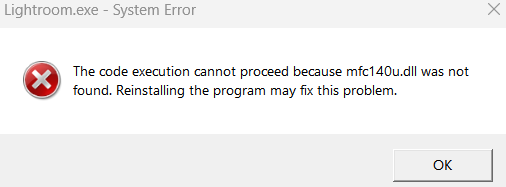
Lightroom Classic & Lightroom won't open mfc140.dil was not found?
Copy link to clipboard
Copied
Lightroom Classic & Lightroom won't open mfc140.dil was not found?

Copy link to clipboard
Copied
I updated the app and now it wont open on my computer. I can use it if I am on an online browser, but not as an app on my computer. I get a little tab that pops up and says, " The code execution cannot proceed beacause mfc140u.dil was not found. Reinstalling the program may fix this program." I have tried to reinstall the app but the same thing happens. Is this a fault in the app or my computer?


Copy link to clipboard
Copied
Thanks for highlighting the issue that you see with Photoshop. We're here to help.
Which version of Lightroom are you using? When do you get the error message?
Please try the steps suggested in this similar discussion: https://community.adobe.com/t5/lightroom-ecosystem-cloud-based-discussions/p-lightroom-mfc140u-dll-m....
Let us know if that helps.
Ranjisha


Copy link to clipboard
Copied
@Ranjisha Sengupta wrote:
Which version of Lightroom are you using? When do you get the error message?
Please try the steps suggested in this similar discussion:
Are you using Photoshop or Lightroom? You posted to the Photoshop forum and we can move your post if needed.
Jane
Copy link to clipboard
Copied
Hi everyone, just fixed my issue with mfc140.dil. First load this page.
mfc140u.dll : Free .DLL download. - DLLme.com
Then go to windows Icon and type in search bar System Information > Click on Service info and find what bit your laptop is running on.

Select your system type then click download. Once complete open the file to see it's now downloaded.
Now click on My PC > Hardrive > Windows file > locate System 32 file
Now drag and drop your new MFC140 file into the System 32 file, if you get replace file, click on replace file. Once completed LrC & Lr opened up. Hope this helps everyone.

Copy link to clipboard
Copied
Downloading executables from some random web site is extremely risky. You never know what's lurking inside of that file.
Freelance concert photographer - thoregilphoto.com
Copy link to clipboard
Copied
This fixed my problem. Thank you!


Get ready! An upgraded Adobe Community experience is coming in January.
Learn more
 AdChoices