Quitter
  • Communauté internationale
    • Langue:
      • Deutsch
      • English
      • Español
      • Français
      • Português
  • 日本語コミュニティ
  • 한국 커뮤니티

GPU acceleration does not work on new MacBook Pro Vega 20 + new LR Classic 9.0

Débutant dans la communauté ,
Nov 10, 2019 Nov 10, 2019

Hi!


I updated to the newest Lightroom Classic 9.0, but unfortunately noticed that the full GPU acceleration is not working on my late 2018 MacBook Pro (15", i9, 32 Gt, Vega 20). I am running latest update of Mojave (10.14.6 (18G1012)).


The setting to use GPU for image processing is greyed out:
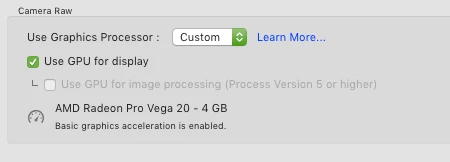
Näyttökuva 2019-11-10 kello 16.55.58.png


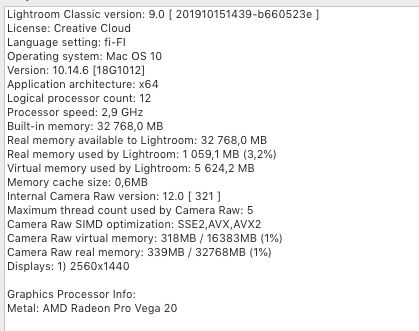
And system info is:

Näyttökuva 2019-11-10 kello 16.56.27.png


As far as I know, this machine should support full acceleration. Is this a bug with the new LR 9.0 update?

Thanks in advance & all the best,
Sakari Mäkelä
Photographer, Finland

646
Traduire
Signaler
Directives de la communauté
Restez bienveillant et courtois, ne vous attribuez pas la paternité des créations d’autrui et assurez-vous de l’absence de doublons avant de poster du contenu. En savoir plus
community guidelines
LÉGENDE ,
Nov 10, 2019 Nov 10, 2019

Unless you have a 4K-5K high-resolution monitor, I wouldn't worry about it. That is primarily what GPU acceleration is for in Lightroom. Otherwise, you won't notice any benefit from having it. I'm using an old HP Pavilion desktop with NO GPU acceleration support, and have no issues with Lightroom Classic.

Traduire
Signaler
Directives de la communauté
Restez bienveillant et courtois, ne vous attribuez pas la paternité des créations d’autrui et assurez-vous de l’absence de doublons avant de poster du contenu. En savoir plus
community guidelines
LÉGENDE ,
Nov 10, 2019 Nov 10, 2019

Exit Lightroom and check if there is a  "TempDisableGPU3" file left over at /Users/USERNAME/Library/Application Support/Adobe/CameraRaw/GPU (macOS) or C:\Users\USERNAME\AppData\Roaming\Adobe\CameraRaw\GPU (Windows)
If so delete that file and relaunch the application


M4 Pro Mac Mini. 48GB
Traduire
Signaler
Directives de la communauté
Restez bienveillant et courtois, ne vous attribuez pas la paternité des créations d’autrui et assurez-vous de l’absence de doublons avant de poster du contenu. En savoir plus
community guidelines
Débutant dans la communauté ,
Nov 10, 2019 Nov 10, 2019

Thank you for the tip! Unfortunately there was no such file in the folder, but there was a "Camera Raw CPU Config.txt" -file under Adobe Photoshop Lightroom Classic -folder (under GPU folder), and it had these kind of lines:


crs:gpu_preferred_system=""
crs:gpu_compute_digest="137EF1F9C01355E1646E2C7FED018D8C"
crs:gpu_compute_quick_self_test_passed="False"/>


So I suppose this is a bug in the new LR 9.0? Has any other with same kind of hardware noticed this issue?

Traduire
Signaler
Directives de la communauté
Restez bienveillant et courtois, ne vous attribuez pas la paternité des créations d’autrui et assurez-vous de l’absence de doublons avant de poster du contenu. En savoir plus
community guidelines
Débutant dans la communauté ,
Nov 11, 2019 Nov 11, 2019

Yes I have been having the same issue with Nvidia Quadro K2000. The test gives a false outcome. In the first instance Nvidia were very helpful but could not work out what Adobe test was asking for. Phone call from Adobe tech - yes a bug will be sorted. Bug fix came and GPU was recognised. Then latest release with Cat 2.2 update (thats a disaster but another story) and GPU no longer recognised. AGAIN. Worst the system is even slower. Adobe tend to pass the buck to the GPU supplier - it may be the solution is in the driver but this is an Adobes issue. Evident as last time no driver update only the Adobe bug fix.

Adobe should have contacted me this morning at 9am - its 9:45 now and no contact.

I had no issues with 8.4 super fast (4x pipeline ssd). Release 9 supposed to improve performance and catalogue - so far its been a bit of a disaster.


Traduire
Signaler
Directives de la communauté
Restez bienveillant et courtois, ne vous attribuez pas la paternité des créations d’autrui et assurez-vous de l’absence de doublons avant de poster du contenu. En savoir plus
community guidelines
Débutant dans la communauté ,
Nov 11, 2019 Nov 11, 2019
LA PLUS RÉCENTE

Good to know, thanks! 🙂 I think I'll downgrade back to 8.4 and wait until 9.0 gets some incremental updates and problems sorted out.

Traduire
Signaler
Directives de la communauté
Restez bienveillant et courtois, ne vous attribuez pas la paternité des créations d’autrui et assurez-vous de l’absence de doublons avant de poster du contenu. En savoir plus
community guidelines