Participating Frequently
August 14, 2019
Answered

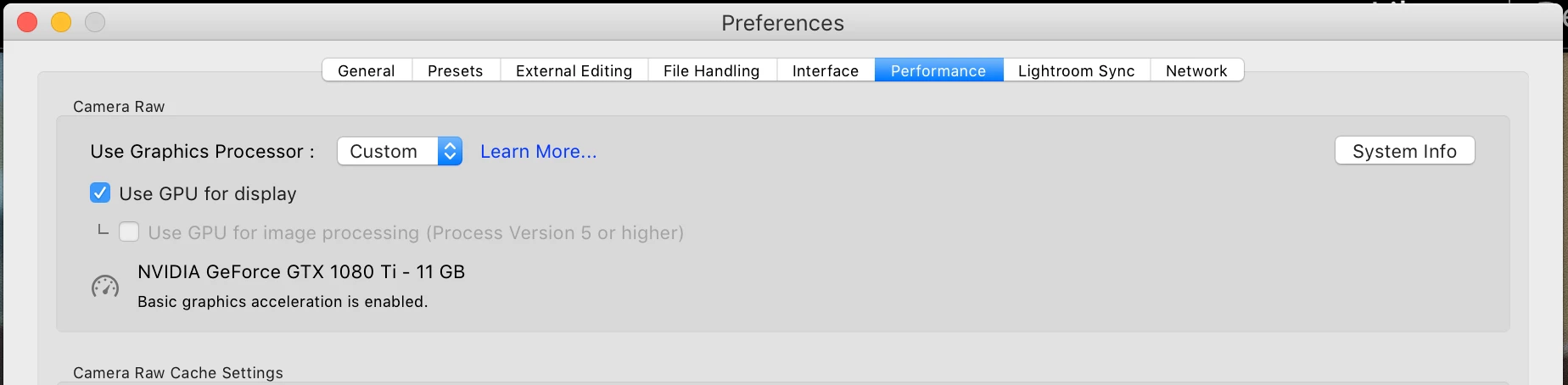
GPU for image processing is Greyed out even though minimum specs are met [branched to new thread]

  • August 14, 2019
  • 6 replies
  • 7720 views

Mine is greyed too

    Correct answer stepbar

    stepbar  wrote

    So how does this impact me who has exactly the same problem on Win 10?

    After you get that GPU drive updates, see if it works, report back yes or no, and if no, include your system information (from LR, at least first line down to just before plugin info)


    Everything is at the latest version - Windows, all drivers, LR etc.

    I can see that Adobe have acknowledged it's a known bug.  Just as well as my 1060 card should have blown away any minimum specs.

    6 replies

    Participant
    July 22, 2020

    I found the solution to this problem for Windows 10 by brute force.

    Follow the following steps :

    1. Close all the Adobe Applications.
    2. Open "C:\Users\USER\AppData\Roaming\Adobe\CameraRaw\GPU"
    3. Then in each of the folders present in this folder there are "Camera Raw GPU Config.txt" files
    4. Open each one of those and find the line "crs:gpu_compute_quick_self_test_passed="False"/>"
    5. Change the "False" to "True" ie. "crs:gpu_compute_quick_self_test_passed="True"/>"
    6. Save the file and start the Adobe Applications.
    julianm91774752
    Participant
    July 5, 2021

    Following Saksham's advice I found that all of the files named 
    "crs:gpu_compute_quick_self_test_passed="False" were already set to "True" but I noticed that within the GPU > Adobe Photoshop Lightroom Classic folder there was a single file called "TempDisableGPU" !!!
    I then renamed this file
    Started Lightroom Classic
    And it seems to work much faster now 🙂 
    Now, after shutting down Lightroom, I have found that within the GPU > Adobe Photoshop Lightroom Classic folder there is a file called "Camera RAW GPU Config" which is set to "True".
    I have no idea what I've done, but it seemed logical 'switch off''  the "TempDisableGPU" file by renaming it.
    And it seemed to work!!!

    Inspiring
    November 23, 2019

    I have the same problem for Windows 10.

    GoldingD
    Legend
    August 15, 2019

    As of about 3 hours ago, officially a known issue. See comment by simonsaith, currently at the end of:

    No Graphics Acceleration v8.4

    simonsaith  wrote

    Thanks all for help troubleshooting and providing the log files to us. At this point, we can confirm that if your OS, GPU card and driver version does not support the DirectX 12/Metal, then the OpenGL based GPU acceleration fallback is no longer available in the latest LrClassic 8.4 release (also applies to ACR 11.4, LrCC 2.4). Although this is recognized as a bug, but the team has planned to drop OpenGL support in the next release. The reason is that some OS vendors have make it public that they will deprecate the OpenGL API soon.

    Practically, this typically means the bug will show up if you have a Windows 7 OS and/or older version of GPU card or driver. There is currently no known workaround for the bug. The team is investigating possible temporary relief. For the long term, customers are strongly recommended to consider updating your machine to the latest Windows and macOS and GPU drivers to take advantage of the possible GPU performance gain.

    dfranzen_camera_raw
    Adobe Employee
    Adobe Employee
    August 14, 2019

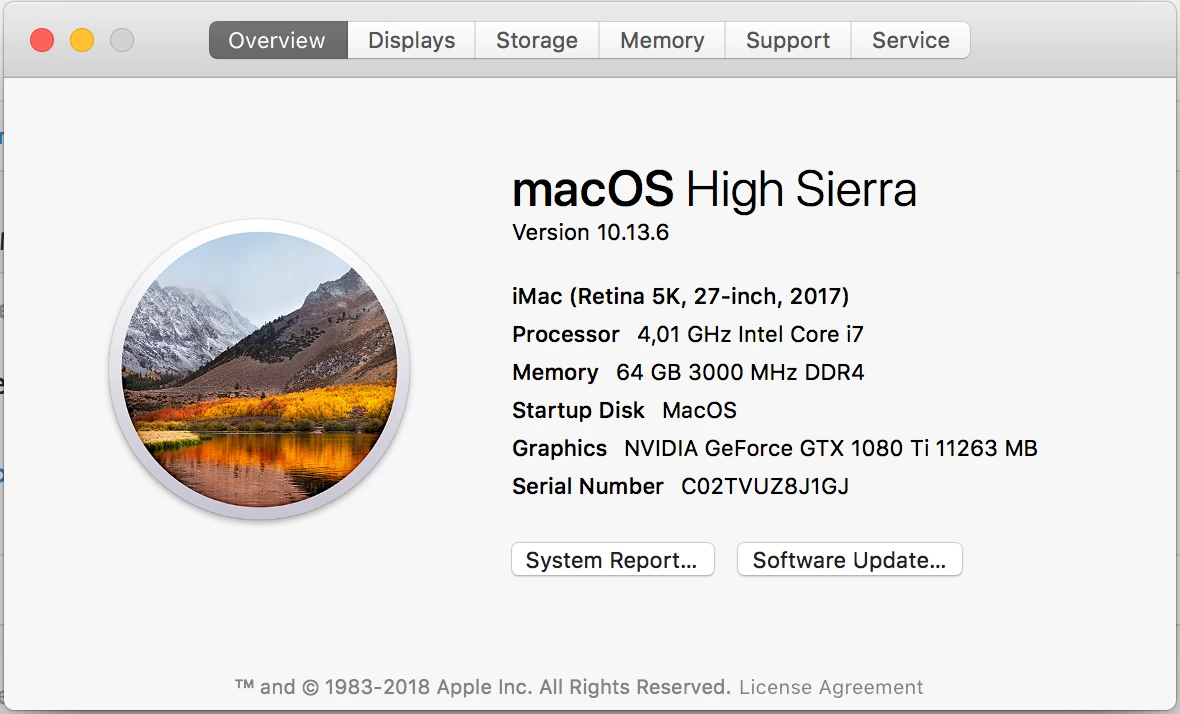
    You need MacOS 10.14 or later for the "Use GPU for image processing" check box to be enabled, and 10.14.5 or later is recommended.

    I don't think the GPU FAQ document for Lightroom Classic 8.4 makes this information very clear, and I'm working with the documentation team to improve that page.

    In the meantime please refer to the "Considerations for Graphics Processor (GPU)-accelerated features | Camera Ra1 11.4" system requirements at this link:

    Camera Raw system requirements

    With respect to these two checkboxes, Camera Raw 11.4 and Lightroom 8.4 have the same requirements.

    In addition to that, I do not know if on macOS the Nvidia GTX 1080 Ti will support Metal. I have not been able to test this configuration. This page from Apple documents Mac that support Metal: Mac computers that support Metal - Apple Support

    For folks running Windows, note that Windows 10 is a requirement for the 2nd check box "Use GPU for image processing." We have seen reports that some folks still using Windows 7 are not able to use the first check box "Use GPU for display," and that matter is under investigation.

    Thanks for your patience,

    David

    LulchevAuthor
    Participating Frequently
    August 14, 2019

    GoldingD
    Legend
    August 14, 2019

    I might be overlooking this bit of info from your screens-shots

    What driver version for that GPU,

    A NVIDIA GeForce GTX 1080 Ti should blow away the maximum specs, should come up as full acceleration.

    My lower model 1070Ti works on my Windows 10 rig

    Sahil.Chawla
    Adobe Employee
    Adobe Employee
    August 14, 2019

    Hi there,

    As Jon has pointed out above, please update the operating system to a more recent version to take full advantage of the GPU.
    Please read this article for more info: OS support for Creative Cloud 2019 apps

    Regards,
    Sahil

    LulchevAuthor
    Participating Frequently
    August 14, 2019

    They want that: "Creative Cloud 2019 apps require macOS Sierra (10.12) or later" I have 10.13.3...

    Inspiring
    August 14, 2019

    It's not OS Specific - I'm on windows with the same issue.

    99jon
    Legend
    August 14, 2019

    Probably because you are still using High Sierra.

    LulchevAuthor
    Participating Frequently
    August 14, 2019

    Now I use hackintosh and wait to release catalina but maybe i should replace intel parts with AMD. Will this option greatly improve the performance of the application?

    Conrad_C
    Community Expert
    Community Expert
    August 14, 2019

    It will not improve everything (yet), but it will improve image processing in the Develop module. It should have no effect on some other areas like exporting, which is still mostly CPU-dependent. But they might GPU-accelerate that later.

    I will add that running macOS 10.14 Mojave is not enough on its own. It must be macOS 10.14.6 or later, because the checkbox won't enable on 10.14.5. It appears to depend on specific code Apple has added very recently in the latest update.