
TheSidewinder
Participant
March 9, 2023
Question

GTX580, using latest nvidia drivers, still get warning to upgrade them

  • March 9, 2023
  • 2 replies
  • 569 views

Not sure if this is really a "bug" per se, but...


Windows 10, using GTX-580 video cards (Yes, I know they are very old, but they work perfectly) and the latest Nvidia drivers for them. Opening Lightroom Classic shows me the warning:
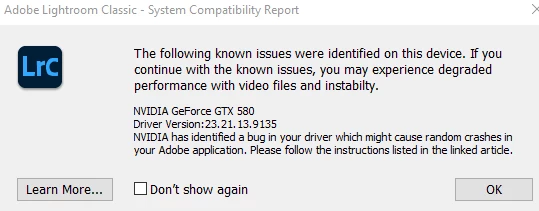
 

The linked "Learn More" instructions are no help, since I am already using the latest (most-recent) drivers for that series of video cards. There is no newer driver.

I have yet to experience crashes, but I just now updated to LrC 12.2.1 and saw the warning for the first time.


Do I just click the box to not show it to me again and keep my fingers crossed?

This topic has been closed for replies.

2 replies

johnrellis
Legend
March 9, 2023

If you experience display bugs or crashes, you can set Preferences > Performance > Use Graphics Processor to Off and that might help. But if you experience problems with AI masking, your only option is to upgrade the graphics card or computer -- Adobe stubbornly refuses to allow use of the GPU for AI masking to be disabled.

GoldingD
Legend
March 9, 2023

Looks like NVIDIA stopped releasing driver updates for that GPU back in 2018. So no new drivers coming. As a result, some newer capability in LrC will not be available for you, either current or forthcoming. With each LrC release, the GPU requirements get changed. Eventually things fail, hence the warning. With each new LrC release, more and more older GPU's and Video Controllers may see that warning.


Adobe stated Bug, implying something wrong that can be fixed. In reality it may be better stated as incompatibility