
stevenphamphoto
Known Participant
February 5, 2022
Question

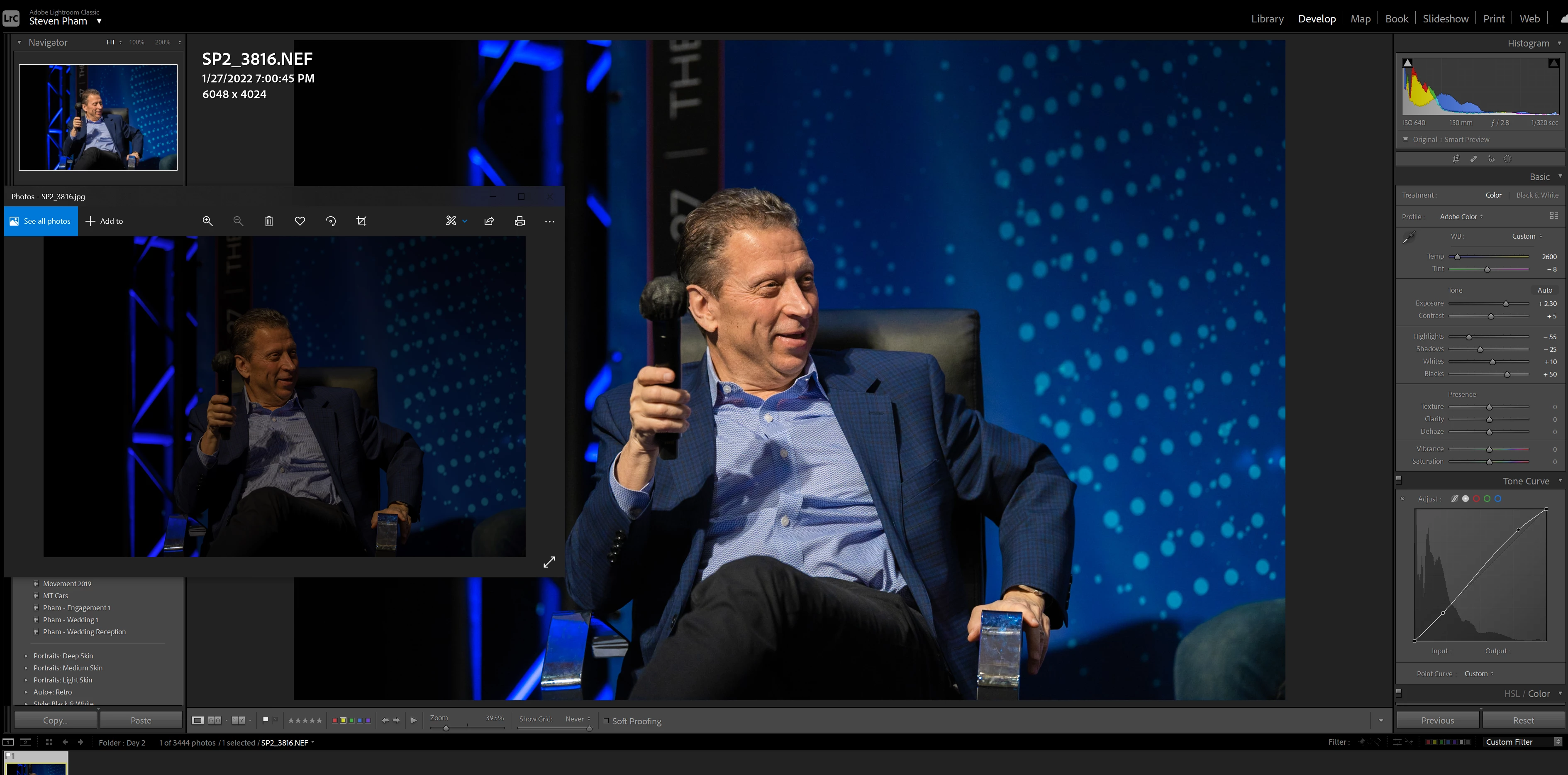
Having issues where the exported images are way darker than what I have edited.

  • February 5, 2022
  • 5 replies
  • 13101 views
Anyone have an issue with LR CC where you export a photo but the export photo is way darker than it should be? Out of 600 photos, a good 30 or so are darker. It's not my export settings or monitor. I check back with my browser, photo viewer, and dropbox it to my phone but the resulting images seem darker than what I edited to.
I have to offset the images by exposure to almost +4 to get it to look right after exporting it.
5 replies

Participant
August 24, 2024

Hi Steven, did you ever come up with a solution to this problem? I have the exact same issue whenever I use smart previews (don't have the problem when not using smart previews, but obviously editing is slower as a result)...

Participant
February 9, 2025

This has been an immensely useful thread. I'm grateful to the OP for opening this topic and to all the people who gave advice, suggestions and performed tests on their own machines to try and replicate the problem. To synthesize what I've learned on the topic I wrote the following post on reddit https://www.reddit.com/r/Lightroom/comments/1ih2hud/lightroom_preview_and_export_look_different/
I'll explain in short here also. For anyone facing the same problem as OP and me go read the following article on preview types: https://digital-photography-school.com/6-types-lightroom-previews
My suggestion is to build standart previews instead of the default setting of embedded. Maybe not use smart previews although I'm not sure they're a problem. And finally for good measure set the high DPI scaling setting of the lightroom.exe to be decided by the application. All of those should make LRC fast enough to work properly and avoid the problem that brought us here in the first place. 

Participating Frequently
June 4, 2024

When you upload online the colour profile gets dropped for a basic monitor rgb one so you need to tweak the gamma curve before uploading. This video explains it: https://youtu.be/rYAjPHz-r18?si=R_zLTWiQUnaK0PIh

stevenphamphoto
Known Participant
February 6, 2022


From windows photo viewer, to Chrome, to Infran view, images are exported somehow way darker han what I see in LR. Again, this only happens to a few photos out of an entire set. 

Community Expert
February 6, 2022

Can you share an image that this happens to including envelop settings? Easiest way is export it to dng and put it on Dropbox or similar. If it is just a few of your images something else is happening. 

stevenphamphoto
Known Participant
February 6, 2022

I uploaded the files here and Dropbox a few minutes ago

TheDigitalDog
Inspiring
February 6, 2022

Any color managed application will match Lightroom Classic which is color managed (ditto for ACR, Photoshop etc). If there is a mismatch, the likelihood is, the 'other' application isn't color managed. Saving to sRGB isn't a solution per se; non color managed applications have no idea what sRGB means. And on a wide gamut display, it looks awful. There may be a disconnect between display A and B if viewing the same image but if you see a big difference on the same machine between Lightroom and some other application on that same computer, that other app is the issue.

Author “Color Management for Photographers" & "Photoshop CC Color Management/pluralsight"
stevenphamphoto
Known Participant
February 6, 2022

I edited the efftect image on my Mac and PC but both displayed the incorrect exposure after exporting. The other 500+ images from the set didn't have any issues. 


johnrellis
Legend
February 6, 2022

Select one of the problem photos and do Metadata > Save Metadata To File. Upload the photo and its .xmp sidecar to Dropbox, Google Drive, or similar and post the sharing link here. That will let others see if the issue occurs in their configurations and narrow down where the problem lies.

Community Expert
February 5, 2022

It appears you are using Lightroom Classic, not CC (which doesn't exist anymore). Three questions. I. What color space are you exporting to? It should generally be sRGB if you are going out to the web. II. What are you using to view the images? I don't recognize that viewer and it wouldn't surprise me if it isn't color managed (very rare on Mac OS X but very common on windows) and if you don't use sRGB with non-color managed apps you can get results that are way too dark. III. How are you calibrating your display? You HAVE to use a hardware calibrator such as colormunki, spyder X, etc. to get correct color even on Macs.

Inspiring
February 5, 2022

Just adding to @Jao vdL , I recently had a similar problem with my prints and the problem turned out to be the intensity of the monitor settings (not the color calibration). I was at 195 and had to drastically reduce the brightness to get it down to 120.