
HDR DNG falls apart at export
Hey all,
I've noticed that the HDR files from both a Nikon D5000 and my Fuji XT2 fall apart as soon as I export the HDR to a DNG out of Lightroom Classic CC. My workflow is the following:
- I need to shoot a hight contrast indoor image
- I therefore shoot a bracketed sequence image (3 shots)
- I import the RAF (fuji RAW) files into Lightroom
- I combine them into a HDR. This generates the 'filename-HDR' DNG file automatically.
- I adjust everything I need to adjust.
- I export to Jpeg. All good.
- For my archive, I export the HDR file to DNG as well. This is where the problem occurs.
Whenever I go back to open up the archived DNG file, it has major losses in the shadow areas. This does not happen to every image but when it does, it concerns a high-contrast HDR and the shadow area falls apart big time.
- I've re-opened the original HDR and exported. File is a wreck.
- I've re-opened the original HDR file and the RAF files it was based upon as well, and exported to Jpeg. File is fine.
- I've exported again to DNG. File is a wreck.
- I've tried to export to DNG with the 'include original RAW file' checkbox checked. File is a wreck.
- I've re-opened the archived DNG file and the RAF files it was based upon as well, and exported to Jpeg. File is a wreck again.
Basically, any exported DNG turns out to be a disaster format for the HDR pics, unless it is the DNG that is automatically generated by lightroom when combining for a HDR file AND the original RAF/RAW files it's based upon are opened at the same time. Which seems odd to me because it basically requires me to save 4 images (the 3 bracketed shots + the HDR merge) + the attache xml of each, instead of one DNG. Please find below:
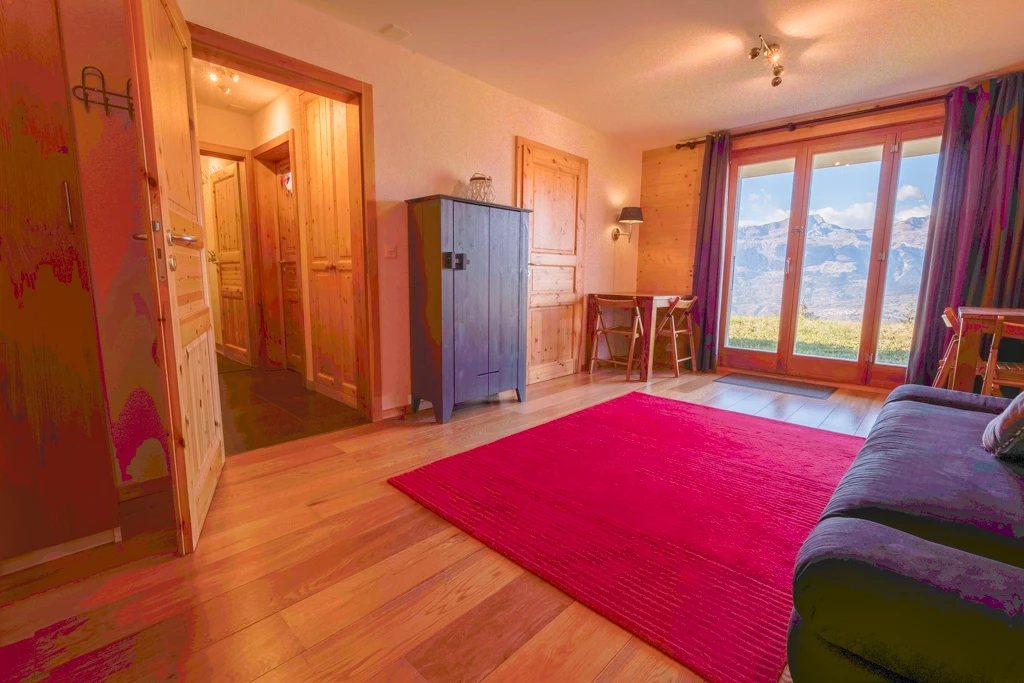
- Jpeg created from the exported DNG which clearly shows the data loss on the left, on the couch, the curtains....all over the place really.
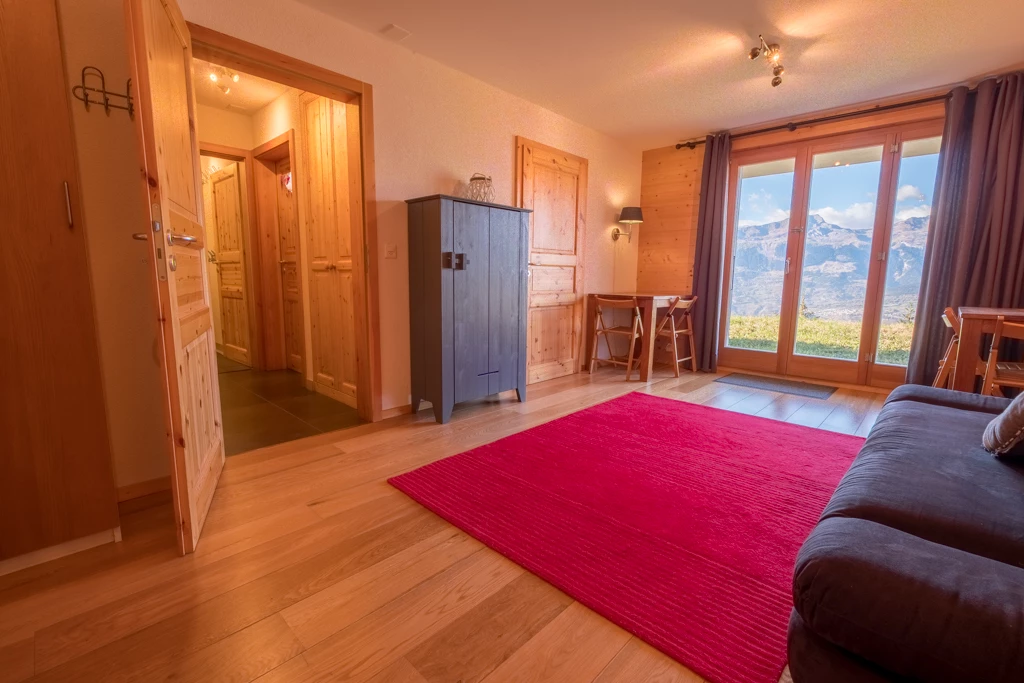
- The Jpeg created from the HDR DNG automatically generated in Lightroom, while I have the original RAF files open in Lightroom as well. If I do not do the latter, the Jpeg will look like crap as well.
- I've included my Lightroom system info as well for the sake of completeness.
Question: How do I export a HDR DNG file without this absurd file loss?
Lightroom-versie: CC 2015.14 [ 1149743 ]
Licentie: Creative Cloud
Taalinstelling: nl
Besturingssysteem: Windows 10 - Home Premium Edition
Versie: 10.0.17134
Toepassingsarchitectuur: x64
Systeemarchitectuur: x64
Aantal logische processors: 8
Processorsnelheid: 2.5 GHz
Ingebouwd geheugen: 16279.6 MB
Beschikbaar fysiek geheugen voor Lightroom: 16279.6 MB
Fysiek geheugen gebruikt door Lightroom: 548.2 MB (3.3%)
Virtueel geheugen gebruikt door Lightroom: 2074.2 MB
Aantal GDI-objecten: 923
Aantal gebruikersobjecten: 2612
Aantal proceshandelingen: 1464
Cachegeheugengrootte: 1276.8MB / 3839.1MB (33.3%)
Maximumaantal door Camera Raw gebruikte threads: 5
Camera Raw SIMD-optimalisatie: SSE2,AVX,AVX2
Virtueel geheugen Camera Raw: 1149MB / 8139MB (14%)
Dpi-instelling systeem: 120 dpi
Bureaubladcompositie ingeschakeld: Ja
Schermen: 1) 1920x1080
Invoertypen: Multi-aanraking: Nee, Geïntegreerde aanraking: Nee, Geïntegreerde pen: Nee, Externe aanraking: Nee, Externe pen: Nee, Toetsenbord: Nee
GPU-info:
GeForce GTX 960M/PCIe/SSE2
Check OpenGL support: Passed
Vendor: NVIDIA Corporation
Version: 3.3.0 NVIDIA 369.09
Renderer: GeForce GTX 960M/PCIe/SSE2
LanguageVersion: 3.30 NVIDIA via Cg compiler
Toepassingsmap: C:\Program Files\Adobe\Adobe Lightroom
Bibliotheekpad: D:\Christian\Pictures\Lightroom\Lightroom Catalog.lrcat
Map Instellingen: C:\Users\Christian\AppData\Roaming\Adobe\Lightroom
Geïnstalleerde plug-ins:
1) AdobeStock
2) Canon-plug-in voor tethering
3) Facebook
4) Flickr
5) Tetheringplug-in voor Nikon
Config.lua-vlaggen: None
(EDITED BY MODERATOR)
 AdChoices