Inspiring
July 24, 2023
Question

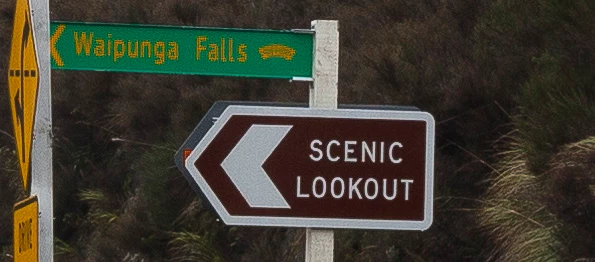
Heavily pixelated sign

  • July 24, 2023
  • 5 replies
  • 735 views

Tried viewing in both lightroom classic and lightroom 5, both times the yellow + green sign appears heavily pixelated despite being right next to another sign which appears fine. Any help appreciated

This topic has been closed for replies.

5 replies

dj_paige
Legend
July 25, 2023

In the original, the green sign seems pixelated as well. Do you not see this in the original?

HmmokthenAuthor
Inspiring
July 25, 2023

Yeah, its the green sign thats causing problwms no matter what version lightroom i view it in. I have played around with the h/s/l settings (yellow colour obviously) which looks better (pixelated-looking wise) though Im not too sure if its made the photo look a little bit fake due to the colours looking a little bit different.

HmmokthenAuthor
Inspiring
July 25, 2023

dj_paige
Legend
July 24, 2023

Are we looking at a 1:1 view? If not, then show us the 1:1 view.

HmmokthenAuthor
Inspiring
July 25, 2023

Have uploaded full size jpg with no processing

dj_paige
Legend
July 25, 2023

I said show us 1:1 view, not full size.

Conrad_C
Community Expert
Community Expert
July 24, 2023

Is this straight out of camera, or edited?


The yellow/green sign kind of looks like it was painted with a masked adjustment brush with a high amount of Sharpness or maybe Texture.

Michael J. Hoffman
Community Expert
Community Expert
July 24, 2023

Can you give more details about the image? What kind of file, what resolution, what camera took it? This looks like a compressed JPG, and JPG compression might not create artifacts as noticeable in the smooth color area of the larger sign.

HmmokthenAuthor
Inspiring
July 24, 2023

Standard resolution RAW file for canon 5d mk2, about 5k+ pixels long

Ian Lyons
Community Expert
Community Expert
July 24, 2023

Can you upload a copy of the otiginal raw file to Dropbox or similar and post the link to the forum? This will allow us to check the file.