


- Home
- Lightroom Classic
- Discussions
- Re: Help! Lightroom gets "stuck" when importing
- Re: Help! Lightroom gets "stuck" when importing
Help! Lightroom gets "stuck" when importing

Copy link to clipboard
Copied
I just downloaded the photography creative cloud (Lightroom and photoshop) , and i am not about to import photos. I have tried doing it directly from the SD card, moving them from photoshop elements, and moving them from other picture files in my mac computer. Every time I try, the program appears to be working but gets stuck while importing (screen only says 'Importing files...'). I can stop it, but i still cannot import. Any suggestions are greatly appreciated!!


 19
Replies
19
19
Replies
19


Copy link to clipboard
Copied
HI - Need a few more details.
What do you mean you are "not about to import photos?"
If you are talking about Photoshop, Photoshop works on one image at a time and you Open a file, Save and Close a file, as with any other application.
If you are talking about Lightroom, the only way LR can let you view your images is by importing them. LR is a data base and functions like a physical book library, creating a catalog of the data about each image including where the actual image is located on your computer or drives. When you import you can select different settings and also tell LR where you wan the actual photo file to move or you can "add" and leave the photo file where it is.
You can import from a card, you can import from any location on your computer or ext drive.
Copy link to clipboard
Copied
Have you watched the free videos on Adobe.com?
Copy link to clipboard
Copied
Thanks for your reply, and I apologize because I just realized that spell check changed a couple of words, and my meaning was difficult to understand. I am using Lightroom, and every time I try to import pictures, the program gets stays on the screen that says "importing files..." I have tried restarting the program and the computer, and even uninstalling it and installing it again. just FYI, I am using a mac computer (older model, mid 2011)
Copy link to clipboard
Copied
HI,
When you click on the word IMPORT on the bottom left of the Library Module, you should get the Import Screen.
From there you need to work your way clock wise around the options of the Import screen, meaning you need to select Where you want to import from, Where you want to put the images, which images you want to import ( these need to be checked), do you want to move, copy, or just add the photo files, and any other options you want as in the screen shot below.
Or are you having problems once past that point?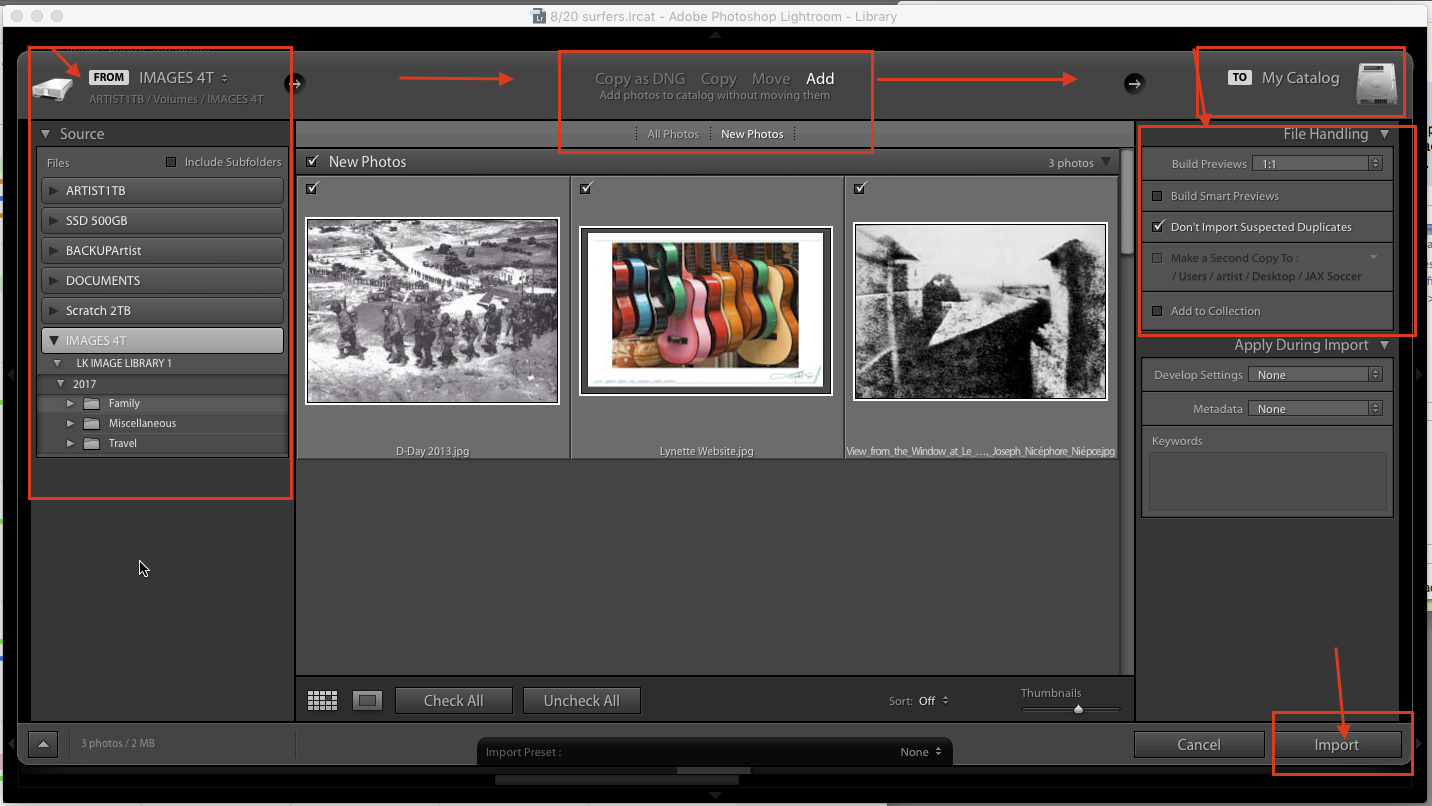
Copy link to clipboard
Copied
Thanks! I have gotten to this point and the next screen goes into importing the pictures, and stalls there.
Copy link to clipboard
Copied
Now I am puzzled. Does the Import dialog box change back to the main Library module screen and do you see a progress bar in the upper left?
Copy link to clipboard
Copied
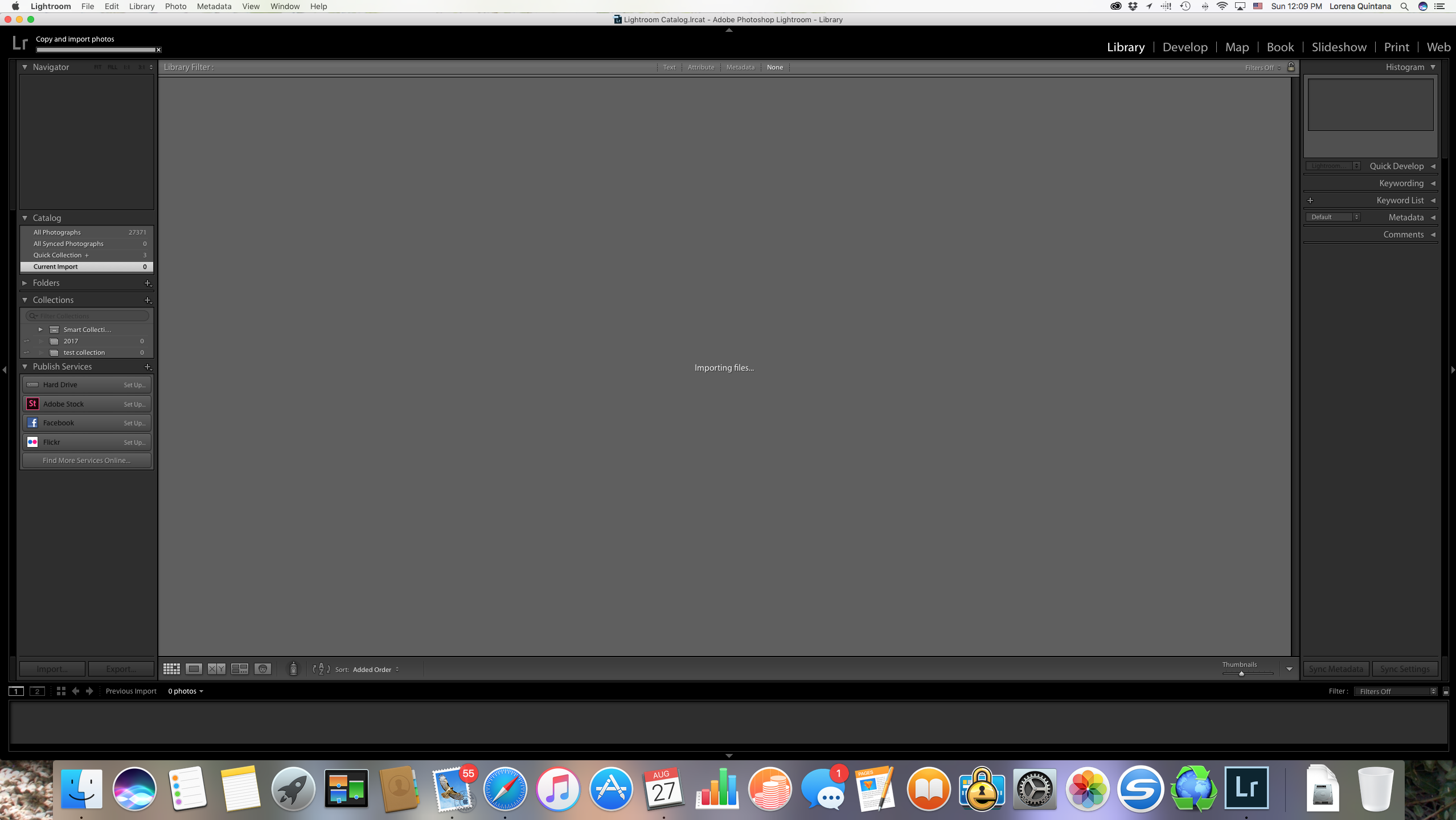 HI, After doing what you told me, this is where the computer gets stuck...
Copy link to clipboard
Copied
The screenshot shows that you are importing 0 photographs.
Try quitting LR. Next make a new folder on your desktop and put a couple of new photos into it .
Then launch LR and try importing from that folder.
And take a screen shot of the import dialog box and send that to this forum.
Somehow, I think LR cannot see the folder from which you want to import.
Copy link to clipboard
Copied
I had not notice!! Apparently the problem is with my computer (it is not communicating with certain programs!).... thanks for all of your help!
Copy link to clipboard
Copied
Glad you figured this out!
Hope you get the computer working again and then get up and running with Lightroom! You'l love Lightroom!

Copy link to clipboard
Copied
I have the same problem as above and it is Oct 4, 2018. This is really frustrating. I have imported thousands of my pictures and this shouldn't be happening. You guys really need to fix this problem !! It is very annoying. I am considering discontinuing my subscription upon the next upcoming renewal. Also, what is this business of you automatically and by default uploading my entire iphone photos library to the adobe Cloud. I DO NOT RECALL GIVING AUTHORIZATION for this !! I have tried in every way I can but there must be a bug between you, iCloud and the phone !

Copy link to clipboard
Copied
Did you read the answer marked Correct. It is from the Original Poster stating that the problem was with his Computer, faulty/bad/malfunctioning hardware.
I suggest you start by checking all your hardware and specifically the drive/folder you have selected in the Destination area of the import dialog window.
Also this post if from 2017, over a year ago, and there has been 3 updates to LR since it was started.
Copy link to clipboard
Copied
this doesn’t resolve my problem nor help with the issue. If you are not
from Adobe, please ignore otherwise provide the appropriate help. i shall
go to social media shortly
Copy link to clipboard
Copied
ScValek wrote
I have the same problem as above and it is Oct 4, 2018. This is really frustrating. I have imported thousands of my pictures and this shouldn't be happening. You guys really need to fix this problem !! It is very annoying. I am considering discontinuing my subscription upon the next upcoming renewal. Also, what is this business of you automatically and by default uploading my entire iphone photos library to the adobe Cloud. I DO NOT RECALL GIVING AUTHORIZATION for this !! I have tried in every way I can but there must be a bug between you, iCloud and the phone !
You Clearly do NOT have the same problem. You write about iPhone and uploading everything to the Adobe cloud. LR Classic CC does not do that. It can't and or won't do that automatically.
LR CC, the Cloud Centric version, does store all images in the clouds. So I suspect you are not using LR Classic CC. You should post your question in the LR CC forum and start a New Discussion instead of adding onto some other discussion that may or may not be similar to your problem.
Copy link to clipboard
Copied
Which part don¹t you see as being the same problem. It is. I have sync
pending stuck on last IMPORT. I cannot import any
New pictures on LR Classic installed on an Apple MacBook Pro 2017. If you
don¹t have the solution, please ignore. I am quite
Busy !!!
Copy link to clipboard
Copied
Syncing to the Adobe cloud has nothing to do with importing images into the LR Classic CC Catalog. The only way to to sync images from Classic LR is to create a collection and Sync that collection.
If you have Add to Collection checked in the import dialog and you have selected a collection that you have already synced up with the Adobe cloud system, that IMO is a very bad idea.
The Original Poster did not say anything about syncing images with the Adobe Cloud system or about using an iPhone or how LR C CC has uploaded all their iPhone images to the clouds.
QUOTE:
Loreq wrote
I just downloaded the photography creative cloud (Lightroom and photoshop) , and i am not about to import photos. I have tried doing it directly from the SD card, moving them from photoshop elements, and moving them from other picture files in my mac computer. Every time I try, the program appears to be working but gets stuck while importing (screen only says 'Importing files...'). I can stop it, but i still cannot import. Any suggestions are greatly appreciated!!
END QUOTE:
Where does the OP say anything about syncing images or using an iPhone.
I still suggest you start a New Discussion and give as much detail as you can about the problem you are having.
Whatever. I'm done. Best of luck to you.
Copy link to clipboard
Copied
Incorrect, pay attention to the title of the post. It reads light room get
stuck when importing.this is exactly what was happening to me. It was due
to a sync error.actually, there is a way to resolve this issue. One must go
to the preferences, go to the synk page, hit the alt key, and reset the
sync.
I just read this, in a post from 2010, thank you very much.this just comes
to show that this is a problem that has long been going on with Adobe light
room and it hasn’t been solved. It is recomforting to know that actually
Adobe have left this option in the preferences pane. Case closed I’ve
managed to resolve the issue not with your help anyways thank you.
Copy link to clipboard
Copied
ScValek wrote
Incorrect, pay attention to the title of the post. It reads light room get
stuck when importing.this is exactly what was happening to me. It was due
to a sync error.actually, there is a way to resolve this issue. One must go
to the preferences, go to the synk page, hit the alt key, and reset the
sync.
I just read this, in a post from 2010, thank you very much.this just comes
to show that this is a problem that has long been going on with Adobe light
room and it hasn’t been solved. It is recomforting to know that actually
Adobe have left this option in the preferences pane. Case closed I’ve
managed to resolve the issue not with your help anyways thank you.
But for completely different reasons. Why you can't see, understand, that is beyond me.
Since you seem to have fixed the problem, somehow, it would be nice for you to post the steps you took to do that so others might learn and benefit from that solution.

Copy link to clipboard
Copied
Hi there, I just used a similar manual import technique as a test to import 2-3 images from my desktop and it worked fine... however strangely that method was required to move images from my desktop to the LR library, yet importing images from a card still work fine.
Is that now a new method?
Not a huge deal for me, as long as the card import works fine I'm ok.
My other problem now is that after I uninstalled and then re-installed LR Classic, most of my library images now have the exclamation point and require manually recovering them from their original destination, is there a quick way of recovering all of these in one action?


Find more inspiration, events, and resources on the new Adobe Community
Explore Now
 AdChoices