
DVDmike
Inspiring
March 8, 2015
Answered

how come I cannot freeform the crop tool anymore?

  • March 8, 2015
  • 3 replies
  • 13212 views

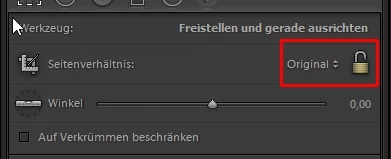
I typically do not maintain a fixed aspect ratio for the cropping tool in Lightroom (2014).  But I needed to change it to a fixed ratio temporarily to crop to some print sizes.  But now, the "Custom" aspect no longer works.  Every time I try to crop anything, it reverts back to "Original" and I cannot change it.  After selecting custom, as soon as I start to drag an edge or corner to crop, the aspect reverts back to "original".

How do I fix this?
This topic has been closed for replies.
Correct answer THG_BO

Hello,

check if the lock is un-locked.

3 replies

dj_paige
Legend
March 8, 2015

If the custom numbers you type in give you the mathematically identical aspect ratio to the original aspect ratio of the photo, then Lightroom will change your custom back to "original". As I recall, sometimes if the numbers are really really close to the original aspect ratio, this will happen. No, I can't quantify what "really really close" means.

Can you give an example where this happens to you? What is the custom aspect ratio your are typing in? What is the original aspect ratio of your photo?

THG_BO
THG_BOCorrect answer
Inspiring
March 8, 2015

Hello,

check if the lock is un-locked.

DVDmike
DVDmikeAuthor
Inspiring
March 8, 2015

Thank you.  I never noticed that lock before.  That was it.  I unlocked it after selecting custom and all is well...

Bob Somrak
Legend
March 8, 2015

Which version of Lightroom are you using  (2014 as you listed is NOT a version).   There were LOTS of bugs in the crop tool in early versions of Lightroom 5 and this one sounds familiar.  The latest version is 5.7.1.  If you have the latest version than there are other things to try but there is no sense trying to debug an old version.

M4 Pro Mac Mini. 48GB