garyw1623995
Participating Frequently
February 25, 2020
Answered

How do I add a copyright symbol to text in Lightroom Classic Book?

  • February 25, 2020
  • 2 replies
  • 4042 views

How do I add  copyright symbol in Lightroom Classic Book Text. The Alt 0169 does not work. I want to include this in the caption of a photo. 

This topic has been closed for replies.
Correct answer Rob_Cullen

It my experience it works if you use the number pad, but not the numbers at the top of the keyboard. 


"it works if you use the number pad, but not the numbers at the top of the keyboard."

True as a general rule, but-

Discovery!!

Normally my numeric keypad (Microsoft keyboard) is set with [NumLock] 'ON', ie. the keypad types the numbers.

I just discovered that if I turn [NumLock] 'OFF' (as it would then work as 'arrow' keys), then the [ALT+ 0,1,6,9] actually works in the Book module text cell!
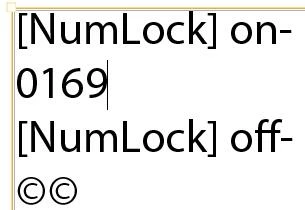
I have learnt something new-yay!!

2 replies

garyw1623995
Participating Frequently
February 27, 2020

Thanks! This worked! Windows 10, Lightroom Classic

Rob_Cullen
Community Expert
Community Expert
February 26, 2020

I do not know your operating system, but-

An easy way in Windows is to open the Character Map and copy/paste the © from the C-Map.

Or Copy/Paste the © from a Word/Text document.

And, YES, Lightroom does not accept the [ALT]0169 method at all in the book module!

Edit: I discovered it does with [NumLock] set to 'off'- see later post!


So the [Alt]0169 suggestions only work for other software like MS-Word...

Using the numeric keypad when you [ALT 0169]? It does not work from the top row of numeric keys.

With some laptops (no numeric keypad) it may be possible for the [Fn] key to enable the numeric keypad that is embedded within the alpha keys, then also hold [ALT] and type 0169 on the alpha keys.  [Fn]+[Alt]+0,1,6,9.

Regards. My System: Windows-11, Lightroom-Classic 15.1.1, Photoshop 27.3.1, ACR 18.1.1, Lightroom 9.0, Lr-iOS 10.4.0, Bridge 16.0.2 .
garyw1623995
Participating Frequently
February 26, 2020

Thanks! I will give that a try. My system is the same as yours. I wonder why the Alt 0169 does not work as it would make it so much easier. 


Theresa J
Community Expert
Community Expert
February 26, 2020

It my experience it works if you use the number pad, but not the numbers at the top of the keyboard.