
New Participant
June 12, 2017
Answered

How do I change backup folder location?

  • June 12, 2017
  • 2 replies
  • 13153 views

How do I change the location of where my files are backed up?  They currently go to my C drive pictures folder.  I have an ASUS computer with a 2 TB built in hard drive, "D" and that is where I want them to go.  I can just transfer them to the D drive but I want that to be the default backup drive.
    This topic has been closed for replies.
    Correct answer Per Berntsen

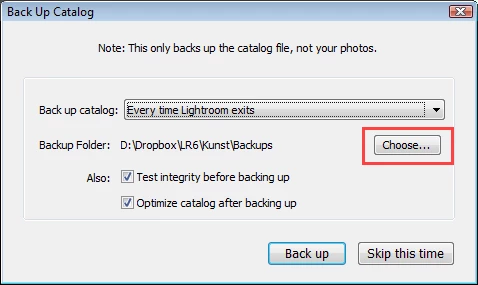
    As far as I know, the only place you can change the backup location is in the backup dialog.

    2 replies

    Participating Frequently
    December 10, 2020

    Unfortunately, lightroom does not or at least no longer offers the option of chosing the back-up location. It simply show the location, which means, I still have no idea how to change the location on C drive, which unfortunately then get synced to and overloads each of my OneDrives.

    Rob_Cullen
    Community Expert
    December 10, 2020

    Lightroom-CLASSIC does!  Lightroom does not!

    So which Version are you using?


    Here is my Backup dialog in V10.1

    Regards. My System: Windows-11, Lightroom-Classic 15.0, Photoshop 27.0, ACR 18.0, Lightroom 9.0, Lr-iOS 10.4.0, Bridge 16.0 .
    Participating Frequently
    December 15, 2020

    Thanks. I use Lightroom Classic.Its dialog box does not let me choose

    a backup location. It simply shows where it backs things up.

    Per Berntsen
    Per BerntsenCorrect answer
    Community Expert
    June 12, 2017

    As far as I know, the only place you can change the backup location is in the backup dialog.