

brucekorb
Inspiring
November 12, 2020
Answered

How do I change the highlight color in survey mode?

  • November 12, 2020
  • 1 reply
  • 887 views

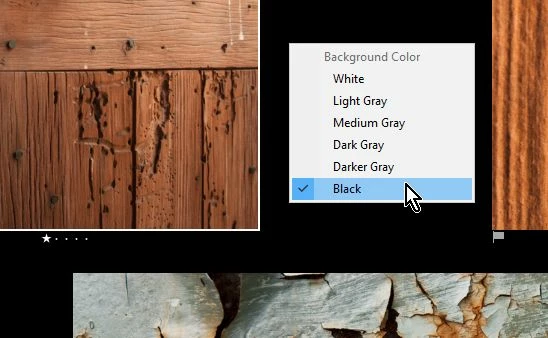
I have two screens, so I have one in the develop module and the other display has a survey mode window open. In the past, the currently-being-developed photo is bordered in white and it is easy to pick it out. The latest update uses an extremely narrow mid-grey border with a light grey background. When I look very, very carefully, I can pick out which one "has focus" (is the primary selection). I do not like having to put so much concentration into determining which photo has primary focus. I like the white border much better. Better still would be a selectable color. So, please, do not tell me that I must live with a two pixel wide border that closely resembled the background color. Tell me how I can fix this. Thank you so much!


P.S. if you can't tell which image is selected below, it's the lower left. And, yes, I can look at the "film strip" in the develop module, but sometimes I'm surveying a dozen or more images that are not all together on the film strip. I really want that white border back.
This topic has been closed for replies.
Correct answer Rob_Cullen

Do a quick [Right-Click] on the 'background' screen and change it to Black, then you will see the white highlight border.

[Right-Click] again to select your preferred background (...grey?).


1 reply

Rob_Cullen
Community Expert
Rob_CullenCommunity ExpertCorrect answer
Community Expert
November 12, 2020

Do a quick [Right-Click] on the 'background' screen and change it to Black, then you will see the white highlight border.

[Right-Click] again to select your preferred background (...grey?).


Regards. My System: Windows-11, Lightroom-Classic 15.1.1, Photoshop 27.3.1, ACR 18.1.1, Lightroom 9.0, Lr-iOS 10.4.0, Bridge 16.0.2 .
brucekorb
brucekorbAuthor
Inspiring
November 13, 2020

Next question: is it necessary for it to be so obtuse? Especially since someone changed stuff. The only background with a low contrast is the medium grey. (Please don't answer. I'm just making myself feel better by asking it "out loud". 🙂

Rob_Cullen
Community Expert
Community Expert
November 13, 2020

Lightroom-Classic is 'full' of obtuseness! 🙂

It took me literally years to discover the 'Amount' spinner triangle for the Brush Tool! At least now it is white and not (visibly hidden) dark-grey as it was previously.

I paid money, never regretted, for the Lightroom Queen's "The Missing FAQ Book" and learnt so much.


Regards. My System: Windows-11, Lightroom-Classic 15.1.1, Photoshop 27.3.1, ACR 18.1.1, Lightroom 9.0, Lr-iOS 10.4.0, Bridge 16.0.2 .