Participant
April 8, 2018
Answered

How do I remove my name from bottom left of photos?

  • April 8, 2018
  • 1 reply
  • 732 views

I have all of my watermarks turned off and my name still appears on the bottom left of my photos.  How do I remove it?  Help please.  Thank you.

    This topic has been closed for replies.
    Correct answer Michael J. Hoffman

    Hi Stacy,

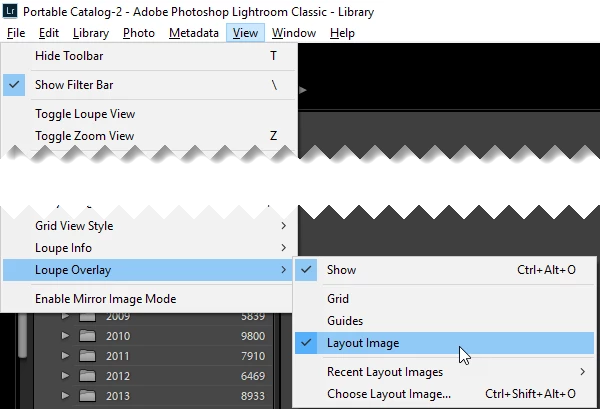
    I wonder if you have a Loupe Overlay active? This will follow across modules, I believe. I use this when I'm shooting tethered in a studio environment and want to show my logo on the images as they pop up on to the screen.

    Ctrl-Alt-O toggles this on and off, or View > Loupe Overlay > Show
    Mike

    1 reply

    Rob_Cullen
    Community Expert
    Community Expert
    April 8, 2018

    I guess you are talking about the Print module in Lightroom- correct?

    You can have both Watermarks and Identity Plate appear on Prints. If your Identity Plate uses your name then that is the most likely reason- you have Identity Plate checked 'on' in the [Page] panel.

    Regards. My System: Windows-11, Lightroom-Classic 15.1.1, Photoshop 27.3.1, ACR 18.1.1, Lightroom 9.0, Lr-iOS 10.4.0, Bridge 16.0.2 .
    Participant
    April 8, 2018

    I am talking about all modules (print, web, etc..).  I have both Watermarks and Identity Plate turned off, and all of the photos still have my name in the lower left.

    Participant
    April 8, 2018

    Hi, Can you post a screen-clip of one of your images viewed in 'Loupe view'? (select and press 'E' )

    Does the name appear in this view?  Or even if you press keyboard 'F' for a full-screen view.

    If your name is visible in any of the above then you may be looking at photos that were exported with a watermark embedded permanently in the photo.


    Thank you both for all your help!. It was overlay that I had active. Problem solved!