Exit
  • Global community
    • Language:
      • Deutsch
      • English
      • Español
      • Français
      • Português
  • 日本語コミュニティ
  • 한국 커뮤니티
2

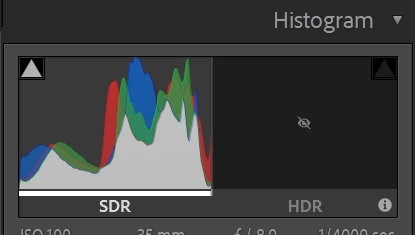
How do I unhide the HDR histogram side?
Community Beginner ,
Dec 25, 2023 Dec 25, 2023

Screenshot 2023-12-25 114827.png

I accidentally clicked or keyed something to hide the HDR side of the histogram in Lightroom. Can't figure out how to undo this. How do I unhide it? 

TOPICS
Windows
808
Translate
Report
Community guidelines
Be kind and respectful, give credit to the original source of content, and search for duplicates before posting. Learn more
community guidelines
LEGEND ,
Dec 25, 2023 Dec 25, 2023

Is your LrC v13.0?

Think that was dealt with in bug fix 13.0.1, and heck, upgrade to 13.1 now.

Translate
Report
Community guidelines
Be kind and respectful, give credit to the original source of content, and search for duplicates before posting. Learn more
community guidelines
Community Beginner ,
Dec 25, 2023 Dec 25, 2023
LATEST

I figured it out.. the preview to SDR rendition was checked. 

Translate
Report
Community guidelines
Be kind and respectful, give credit to the original source of content, and search for duplicates before posting. Learn more
community guidelines
Community Expert ,
Dec 25, 2023 Dec 25, 2023

The [HDR] button is a toggle.  Click on it a second time to revert to SDR.

2023-12-26 06_02_59-Roberts Catalog-v13 - Adobe Photoshop Lightroom Classic - Develop.jpg


Regards. My System: Windows-11, Lightroom-Classic 15.0, Photoshop 27.0, ACR 18.0, Lightroom 9.0, Lr-iOS 10.4.0, Bridge 16.0 .
Translate
Report
Community guidelines
Be kind and respectful, give credit to the original source of content, and search for duplicates before posting. Learn more
community guidelines