
Participant
August 16, 2022
Question

How do you readjust lightroom's automatic masking?

  • August 16, 2022
  • 2 replies
  • 248 views

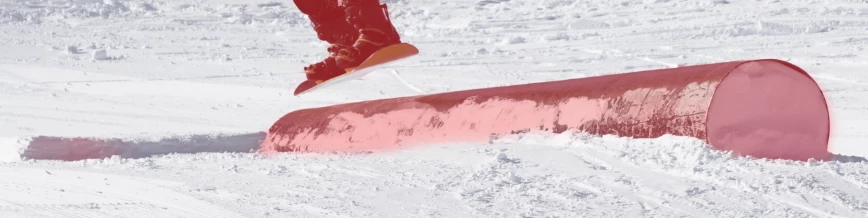
Hello, I am editing a photo and I am using lightroom's new feature of masking. Was great until this one image I have is super annoying. It is just a picture of someone snowboarding and it does a terrible job. I tried removing some of the mask overlay but doesn't seem to work. Below is a reference, please someone assist me. There is nothing else around the person yet it highlights extra stuff. How do I edit this and make it only highlight the whole person?


This topic has been closed for replies.

2 replies

Rob_Cullen
Community Expert
Community Expert
August 16, 2022

If you select the Tool used in the Masking panel (eg. Subject 1) (Not the 'Mask 1' layer) then you click on the [Subtract] button and you can choose a Brush that will remove areas that the AI selected in error.


Regards. My System: Windows-11, Lightroom-Classic 15.1.1, Photoshop 27.3.1, ACR 18.1.1, Lightroom 9.0, Lr-iOS 10.4.0, Bridge 16.0.2 .
elie_dinur
Participating Frequently
August 16, 2022

You edit the mask manually by selecting Add or Subtract or both and choosing the tool with which to do it.