oliver0541
Inspiring
February 27, 2019
Answered

How to accept all person suggestions ?

  • February 27, 2019
  • 1 reply
  • 2469 views

After importing a new photo, lightroom suggests person names based on its face detection algorithm. Very often, all suggestions for all the people in the picture are correct. Is there a way to say "Yes, that's correct for all persons" instead of clicking through all faces in a sequence ?

This topic has been closed for replies.
Correct answer Conrad_C

Conrad, please forgive me. But are we talking about the same scenario ? Consider the following picture after import:
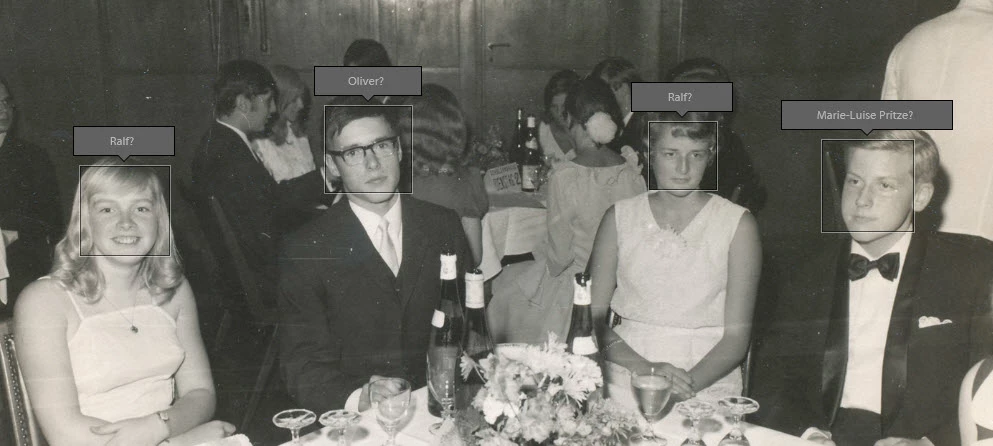
There a four people, each having a suggestion. Assume, that they are all correct (which they aren't). Where do I have to click to accept them all ? What do you mean by "check mark that appears after the question mark" ?


Oh, now I see. No need to apologize, since your picture shows me that I assumed you were in a different view...that's my fault. I thought you were in People view, but you're in Loupe view with faces shown. So I was explaining something you weren't seeing.

To select multiple faces and accept them all at once, Lightroom needs to be in People view (choose View > People). That's the grid view shown in my earlier post. You can also enter People view by clicking the button next to the red arrow below, in the Toolbar at the bottom of the window (if it isn't showing, press the T key). The view you've been in is Loupe (single image) view with faces highlighted, indicated by the icon next to the red A below.

Unfortunately, I don't know of a way to accept all of the faces at once in Loupe view. If there is a way, someone else will need to tell us.

I answered the way I did because I had been working in People view recently, so I wasn't thinking of the view you're working in. People view shows faces found in any photos within the currently active folder or collection, so I like it because of that ability to accept or reject the same face across many photos at once.

1 reply

Conrad_C
Community Expert
Community Expert
February 27, 2019

You can select all of the faces that have correct suggestions, and if you click the check mark for any one of the selected faces, they'll all be confirmed at once

You can use the same selection techniques as on your desktop or in the Lightroom Filmstrip/Grid: Shift-select a continuous range, or Command/Control-click faces for a discontinuous selection. So if 100 faces in a row have correct suggestions, you can Shift-click the first and last ones and confirm all 100 in an instant.

oliver0541
Inspiring
February 27, 2019

What do you mean by "You can select all the faces" ?

Conrad_C
Community Expert
Conrad_CCommunity ExpertCorrect answer
Community Expert
February 27, 2019

Conrad, please forgive me. But are we talking about the same scenario ? Consider the following picture after import:

There a four people, each having a suggestion. Assume, that they are all correct (which they aren't). Where do I have to click to accept them all ? What do you mean by "check mark that appears after the question mark" ?


Oh, now I see. No need to apologize, since your picture shows me that I assumed you were in a different view...that's my fault. I thought you were in People view, but you're in Loupe view with faces shown. So I was explaining something you weren't seeing.

To select multiple faces and accept them all at once, Lightroom needs to be in People view (choose View > People). That's the grid view shown in my earlier post. You can also enter People view by clicking the button next to the red arrow below, in the Toolbar at the bottom of the window (if it isn't showing, press the T key). The view you've been in is Loupe (single image) view with faces highlighted, indicated by the icon next to the red A below.

Unfortunately, I don't know of a way to accept all of the faces at once in Loupe view. If there is a way, someone else will need to tell us.

I answered the way I did because I had been working in People view recently, so I wasn't thinking of the view you're working in. People view shows faces found in any photos within the currently active folder or collection, so I like it because of that ability to accept or reject the same face across many photos at once.