
April 28, 2019
Question

How to add iPhone as a folder in LC in Win 10?

  • April 28, 2019
  • 1 reply
  • 872 views

Dear community,

I used to have an extra folder (which appeared as a drive in my folders section in the library panel):
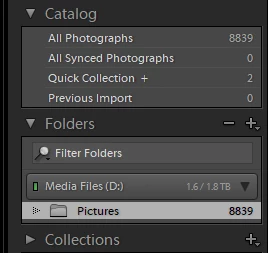
Right underneath Media Files drive, I would have another drive called Bart's iPhone with a folder called imported photos. This was there since I can remember and I did not add it manually. It just somehow set it up itself. However, today I accidentally removed it. I was trying to add it by connecting my iPhone and then adding it as a drive but it is not possible. I have no idea what to do. I did some Google search trying to find out how to add a device (an iPhone) to that folder section but I did not find anything substantial. Would you be able to tell me how to resolve my problem?

Kind regards,

Bart Bulowski

This topic has been closed for replies.

1 reply

Just Shoot Me
Legend
April 28, 2019

I don't believe you can add an iPhones internal storage space as a drive and folder in LR. If anything it is seen as a Removable Drive, like a memory card, and you can't add those to the Folder section of the LR Library module.

April 28, 2019

https://forums.adobe.com/people/Just+Shoot+Me  wrote

I don't believe you can add an iPhones internal storage space as a drive and folder in LR. If anything it is seen as a Removable Drive, like a memory card, and you can't add those to the Folder section of the LR Library module.

Are you sure? Do you know how to make it work like that again? How did it do it before? I did not set it up myself so I have no idea. Would appreciate any help.

Kind regards,

Bart Bulowski

Just Shoot Me
Legend
April 29, 2019

1. Not sure but I would say yes.

2. Yes it does

3. Yes it does

4. I just want to know what happened to it so that I have an understanding of how LR works:

Here is the screenshot of my other PC at work on which this still seems to work fine so that you can understand what I mean:

As you can see on the right-hand-side panel, Bart's iPhone is there


Next to, to the left of, Bart's iPhone is the icon for showing that phone and or it's images is synced with the mobile and web system.

You can only sync up to the web/mobile system from ONE computer running LR Classic. Your work computer is so your home computer won't be able to.