
Participant
May 26, 2018
Answered

How to add new photos in an existing catalog, not empty

  • May 26, 2018
  • 3 replies
  • 8453 views

Hi everyone!

So, I have a catalog, create a few weeks, and today I tried to import new photos to him but wasn't possible as I expected.

When I select some pictures from the folder and drag for the inside of LR, my existent pictures (before the operation) disappeared. And the same occurred when I tried using the button "import".

Doesn't possible put more pictures in an existing catalog that already had photos inside?

Regards,

Gabriel Castro Fernandes
This topic has been closed for replies.
Correct answer gabrielc6626622

Yeap, I think that it's, by default LR import new pictures above existing files.

But (for my happiness), if you put new photos inside the folder that you used to create the catalog, it's possible to sync and see these pics.

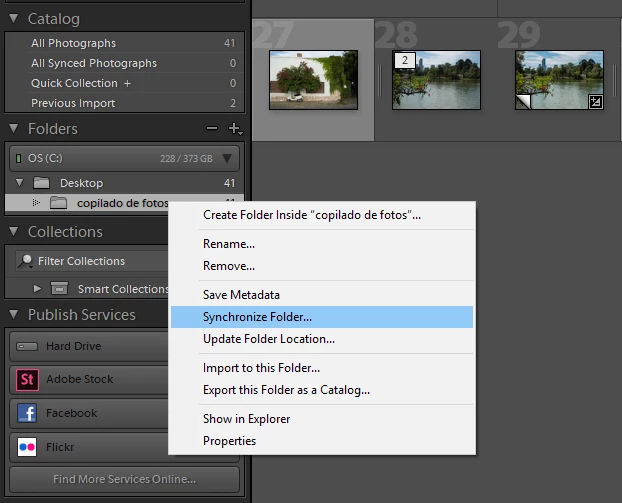
For do this, go in folders and click with right button of the mouse in your folder, select "synchronized folder" and a popup will appear showing a count of new pics that you can sync in your catalog (images below).

Thank you for the clear answer, was very useful

Regards,

Gabriel Castro

3 replies

Participant
April 6, 2022

Make sure you are in the LIBRARY section, look to your left and you'll see CATALOG

Look under Catalog and click ALL PHOTOGRAPHS. All photos that have been uploaded that you haven't removed can be found here.

dj_paige
Legend
May 26, 2018

On the left hand side of the Library Module, click on "All Photographs" (its under Catalog)

JP Hess
Inspiring
May 26, 2018

I think the default behavior of Lightroom is to switch to the folder that contains the newly imported images. But if you go to the Library module and look at the list of folders in the left-hand column, I think you will see that all of the previous folders that you have imported are still there and available. Lightroom is just focusing on the new images so that you can work on them.

gabrielc6626622AuthorCorrect answer
Participant
May 26, 2018

Yeap, I think that it's, by default LR import new pictures above existing files.

But (for my happiness), if you put new photos inside the folder that you used to create the catalog, it's possible to sync and see these pics.

For do this, go in folders and click with right button of the mouse in your folder, select "synchronized folder" and a popup will appear showing a count of new pics that you can sync in your catalog (images below).

Thank you for the clear answer, was very useful

Regards,

Gabriel Castro