


- Home
- Lightroom Classic
- Discussions
- Re: How to delete photo from album and completely ...
- Re: How to delete photo from album and completely ...

Copy link to clipboard
Copied
Hi everyone,
I was wondering if there is a way to delete a photo from an album, and at the same time delete it from the Lightroom Library completletly. When I delete it, it only is deleted from the album, but still exists in "All Photographs".
Thank you in advance and I hope everyone is healthy!


 3 Correct answers


Hi Max,
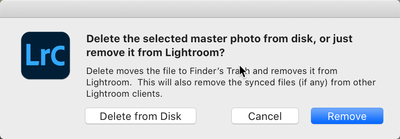
When you right click on an image(s) you are presented a window that offers to remove the image. But as you've discovered that just removes it from the catalog. To really get rid of it, select the option to the left "Delete from Disk."
Let me know if you have any other questions

Hi Max,
That's why when you right-click on an image in a Collection it says "Delete from Collection." Collections, as I'm sure you know, are essentially aliases of the images and not the actual images. (BTW: in your original question, you didn't state where you were trying to delete the image(s) from.)
Dennis is correct about the "no warning" issues but if you do have 2nd thoughts about having deleted an image, you can find them in your trash can.
One way to have the best of both worlds is
...
"Albums" is a term/feature in Lightroom, not Lightroom Classic. But if you are using Lightroom Classic and you are referring to collections then you cannot delete an image from disk from inside a collection. You must either go to All Photographs or to the folder containing the image you want to delete. The only option you have in the collection is to delete the image from that collection.
 6
Replies
6
6
Replies
6

Copy link to clipboard
Copied
Hi Max,
When you right click on an image(s) you are presented a window that offers to remove the image. But as you've discovered that just removes it from the catalog. To really get rid of it, select the option to the left "Delete from Disk."
Let me know if you have any other questions
Copy link to clipboard
Copied
Hi Gary,
Thank you for your answer and sorry for my late reply! I know this feature that you're talking about and I use it too. My question was how I delete them from the Disk while looking at photographs from the inside of Collections. When I try to delete a photograph from there, the "Delete from Disk" option does not appear, it only says remove. The photo is then removed from the collection, but not from the catalog.
Best,
Max

Copy link to clipboard
Copied
Use with great caution. Neither of these suggestion give you a confirmation dialog.
Alt+Del will remove the image in a collection from your catalog, but no confirmation dialog will appear.
OR
The so-called "splat delete" Shift+Ctrl+Alt+Del will delete the photos from the collection and from Lightroom Classic and from your hard disk, but no confirmation dialog will appear. Once you do this Shift+Ctrl+Alt+Del, your files are gone.
Please be careful. You have been advised of the possible dangers.
Copy link to clipboard
Copied
Hi Max,
That's why when you right-click on an image in a Collection it says "Delete from Collection." Collections, as I'm sure you know, are essentially aliases of the images and not the actual images. (BTW: in your original question, you didn't state where you were trying to delete the image(s) from.)
Dennis is correct about the "no warning" issues but if you do have 2nd thoughts about having deleted an image, you can find them in your trash can.
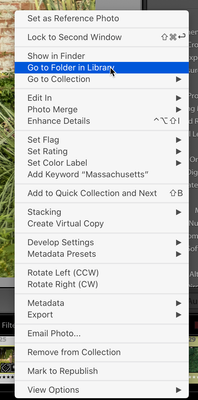
One way to have the best of both worlds is to right-click on any image in the Collection and select "Go to Folder in Library." This will give you the access to the image where my previous advice will work fine. If you select more than one image, if the images are all in the same Library folder than all will show up in the Library but if they are in different folders than only the primary image will be selected when you get there. After you delete the image from the Library view (not the Collection view), it will be deleted in any Collection that contains that image (alias).
Hope this helps!

Copy link to clipboard
Copied
This is a great example of so-called "Community Experts" (in this case, Gary and Hess) constantly and insecurely dishing out bad information that's totally unresponsive to what's actually being discussed, and what started this topic in the first place. We already know that deleting from a collection doesn't necessary delete from the disk; we're demanding a simple feature to delete from the disk while inside the collection instead of going to All Photographs or gigantic folders that are unorganized. @dj_paige provided the answer that should be marked "correct" and Adobe should give us the ability to downvote/kill bad advice like that from @JP Hess and @gary_sc
Copy link to clipboard
Copied
"Albums" is a term/feature in Lightroom, not Lightroom Classic. But if you are using Lightroom Classic and you are referring to collections then you cannot delete an image from disk from inside a collection. You must either go to All Photographs or to the folder containing the image you want to delete. The only option you have in the collection is to delete the image from that collection.


Find more inspiration, events, and resources on the new Adobe Community
Explore Now
 AdChoices