


- Home
- Lightroom Classic
- Discussions
- Re: how to determine aspect ratio?
- Re: how to determine aspect ratio?
how to determine aspect ratio?

Copy link to clipboard
Copied
How do you determine the aspect ratio, in LR, of an existing image? I know how to change it, but don't see a way to determine it.


 17
Replies
17
17
Replies
17


Copy link to clipboard
Copied
Open the crop tool in the develop module and it will tell you if it is a size that you have a preset for, otherwise it will say "custom size".
Copy link to clipboard
Copied
Thanks for the reply...is there a way to determine the aspect ratio of a custom size? I've got two images in LR, and I want them both to have the same aspect ratio. So I want to check the ratio of one of the images so I can change the other one to match. I know how to do this in Photoshop, but it woudl be great if I could do it in LR. I just realized I can do that by using "sync setting" and checking "aspect ratio".
Still curious though, if there's a way to determine the custom AR.

Copy link to clipboard
Copied
It's shown in the crop panel:

Beat
Copy link to clipboard
Copied
I've been looking there, in the crop panel. Most of my images say "original" or "custom." I think maybe a specific ratio only show if you've cropped and chosen one. I've done crops just by eye--as oppposed to specifying a ratio--and those read as "custom" after the crop.

Copy link to clipboard
Copied
Press 'G' to go into Grid Mode in the Library Module. Then press 'Control + J' (or the Mac alternativce) to bring up the Grid View options. Set one of the options to 'Cropped Dimensions' and close the dialog box. Now whenever you are in Grid View, you should see the cropped dimensions of every photograph. To obtain the aspect ratio, put these dimensions into a calculator.

Copy link to clipboard
Copied
Is there a list of most sapect ratios for photo frame sizes, example: 14 x 11 or 20 x 16, My Canon 5D Mark II gives me a 6 x 4 photo. Without an aspect ratio for other photo sizes and NO RULER in the Develp mode there in way to see the effect of a crop for other photo/print sizes...only the 5 given in the crop tool.
Copy link to clipboard
Copied
Hi Photo31,
You can easily calculate the aspect ratio of any frame size with a calculator - it's just basic maths.
However, there's no need to calculate an aspect ratio in Lightroom. Just use the 'Enter Custom' function for the aspect ratio in the Crop tool, and enter your picture size (for example, 20x16). Lightroom will then display a crop that is locked to this aspect ratio. You can then resize it as much as you require, and LR will still keep it at your desired aspect ratio (as long as you don't check the 'locked' icon).
Cheers,
Alan
Copy link to clipboard
Copied
Alan, thank you, thank you for your help. In Scott Kelby's book Lightroom3 for Digital Photographers there is no mention of the Custom Crop or what you just told me. Is there a secret to getting help from Adobe regarding Photoshop or Lightroom?
Copy link to clipboard
Copied
Hi Photo31,
Here's a link to the relevant section of the Adobe Lightroom 3 Help file - it should give you all the advice you need about cropping;
http://help.adobe.com/en_US/Lightroom/3.0/Using/WS43660fa5a9ec95a81172e081210db09b94-8000.html
Cheers,
Alan
Copy link to clipboard
Copied
You can see both the uncropped and cropped size in the Metadata panel in Library.
Beat Gossweiler
Switzerland
Copy link to clipboard
Copied
Thanks for the responses folks. Getting back to this a little late.
"You can see both the uncropped and cropped size in the Metadata panel in Library."
I'm looking for the aspect ratio, not pixel dimensions.
"It's shown in the crop panel"
I don't think aspect ratio shows there unless you've cropped the image; otherwise it shows as "original."
"Press 'G' to go into Grid Mode in the Library Module. Then press 'Control + J' (or the Mac alternativce) to bring up the Grid View options. Set one of the options to 'Cropped Dimensions' and close the dialog box. Now whenever you are in Grid View, you should see the cropped dimensions of every photograph. To obtain the aspect ratio, put these dimensions into a calculator."
Again, I'm not looking for cropped dimensions, I'm specifically looking for aspect ratio. I found an online aspect ratio calculator, but I was wondering if there was a way to determine this in LR.

Copy link to clipboard
Copied
Surely the two posts above from Alan Garrett give you your answer.
Copy link to clipboard
Copied
Alan was replying to photo31 who wanted to know how to change aspect ratio for specific print sizes. My question is about how to determine the aspect ratio (from an uncropped image). As far as I can tell you can't directly do this with LR; you can see what the dimensions are, but the aspect ratio isn't displayed anywhere unless you've already cropped to a specific a.r. Or am I missing something?
Copy link to clipboard
Copied
Yes, I see your point. Having just played around I find that I can crop to any shape or size but nowhere can I find the measurements or ratio of that crop, short of using a ruler on the screen and a calculator as previously suggested. The dimensiions of the original do not help because the displayed dimensions do not change as you resize the crop. And as you don't know the dimensions of your crop you cannot enter a custom ratio either. I think it is something that would be helpful in a new release of LR - to show the ratio as you drag around the crop tool.
PS. I am wrong. The dimensions displayed in the overlay (toggle the letter "i" to get the dimensions displayed) DO change as you drag the cropping tool. You can then enter exactly those dimesions as a custom ratio and call up that ratio to crop subsequent photos to the same ratio, which I think acieves your original objective.
Copy link to clipboard
Copied
If you set Crop Dimensions as one of the things to show in Loupe View, you get this:
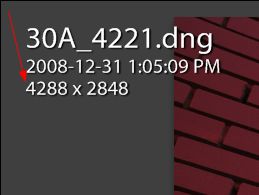
In that screenshot, 4288 / 2848 is the aspect ratio. It isn't in lowest terms, is all.
Hal
Copy link to clipboard
Copied
Hal, thanks. I had reached that conclusion myself and just went back and edited my above post to that effect.

Copy link to clipboard
Copied
In Grid View or Library View go to >View >View Options - or press Ctrl/Cmd + "J" - and select <Cropped Dimensions> in <Loupe View> or in <Grid View>. In Grid View you have to check the box <Show Grid Extras. first and then at the bottom under <Expanded Cell Extras> you can select <Cropped Dimensions>.
Don't get confused by the words <Cropped Dimensions> - if you didn't fo any cropping what shows will be the pixel dimensions of the photo as it came from the camerra.
The pixel dimensions will be displayed in Loupe View and in Grid View on the frame. Then just divide one number by the other and you get the aspect ratio.
For instance my display shows "3872 x 2592". Now: 3872 / 2592 = 1.49 = aspect ratio.
WW


Find more inspiration, events, and resources on the new Adobe Community
Explore Now
 AdChoices