
davcarv
Participant
April 2, 2018
Answered

How to Edit LightRoom Classic CC Export PreSet

  • April 2, 2018
  • 3 replies
  • 5836 views

I've created an Instagram Export Preset. I want to update the preset and save the change I've made. My only option is to Add/Remove the preset.

The question is how do i make an update and save it the updated Export Preset?
This topic has been closed for replies.
Correct answer Sean McCormack

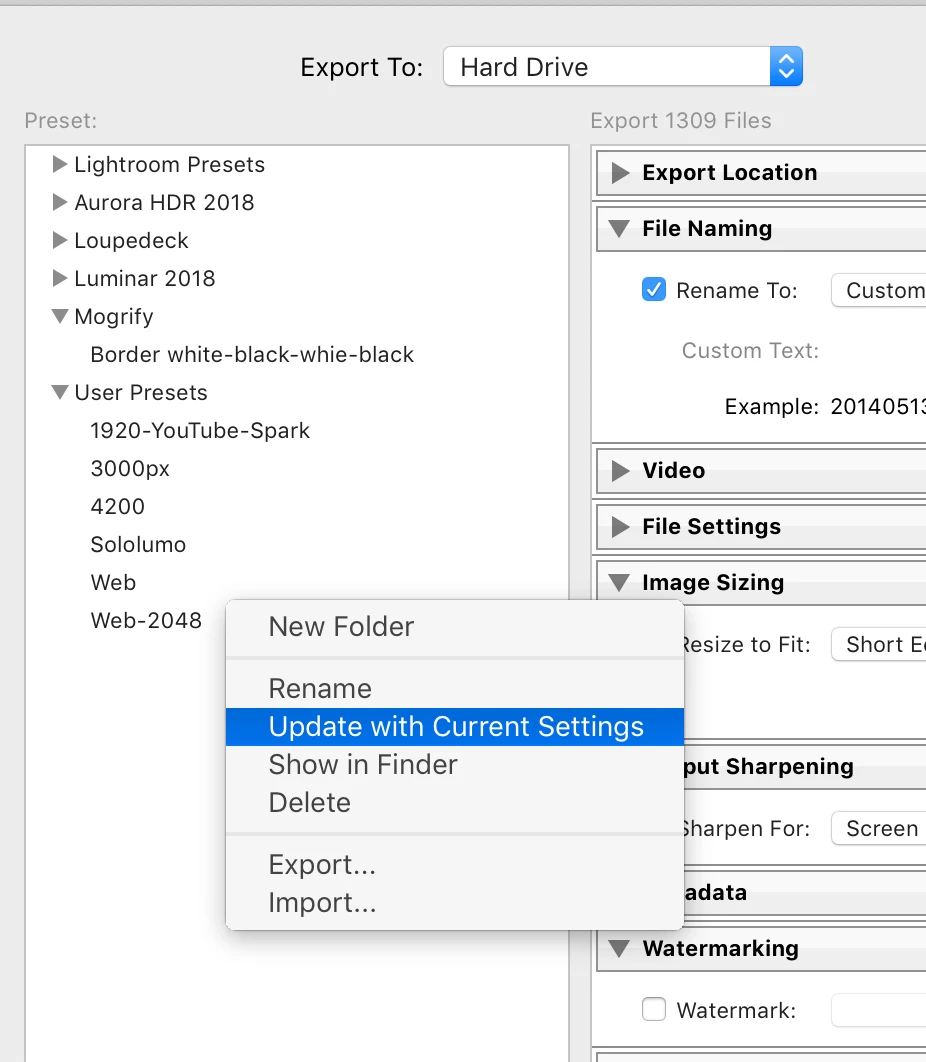
Right click on the preset after you've made the changes, and choose 'Update with Current Settings'

3 replies

Participant
March 5, 2021

Has anyone figured out how to edit the default presets? I would like a preset which allows me to export to Mac Mail, at 2000px wide. But the default email preset is 500px, and the user presets do not allow me to export to Mail.

Bob Somrak
Legend
March 5, 2021

@Laura5FBB 

Just pick Email at the top of the Export dialog and save as a preset.  It will create an Export to Email preset in your user preset section.


M4 Pro Mac Mini. 48GB
Maruhana
Known Participant
February 4, 2021

You guys badly need a new head of interface design at Lightroom classic. 


No only because of this ...

Sean McCormack
Community Expert
Sean McCormackCommunity ExpertCorrect answer
Community Expert
April 2, 2018

Right click on the preset after you've made the changes, and choose 'Update with Current Settings'

Sean McCormack. Author of 'Essential Development 3'. Magazine Writer. Former Official Fuji X-Photographer.
davcarv
davcarvAuthor
Participant
April 5, 2018

Thank you Sean. That did it for me.

you'd think it'd be more obvious.