
PROVINZ
Inspiring
February 21, 2023
Answered

how to filter all pictures without geo-tag?

  • February 21, 2023
  • 1 reply
  • 413 views

while cleaning my catalogue i really like the library-feature to have a quick-collection of all fotos without keywords. I can then add  keywords to them until the mentioned collection is empty. 

Does anybody know about a similar feature for adding geo-tags to them?

thx
 

This topic has been closed for replies.
Correct answer Jim Wilde

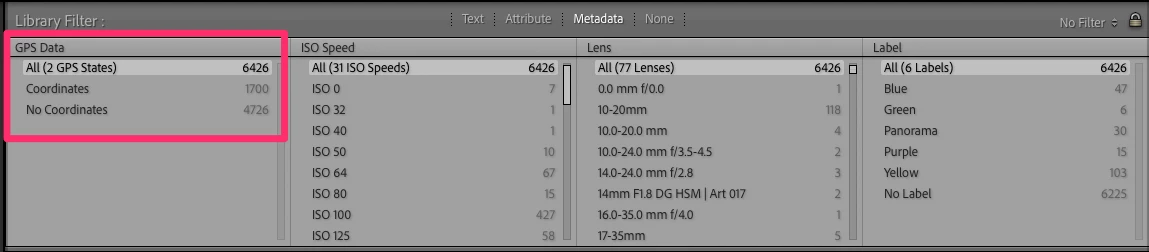
Use the Metadata option on the Library Filter bar (in Grid view, use the backslash key to show/hide the Filter Bar, then click on Metadata). You can select from many different filter types, including GPS Data....see this screenshot:


Alternatively, you can setup your own Smart Collection to show images which have no GPS data. That dynamically updates to remove images as you add GPS data to them.

1 reply

Jim Wilde
Community Expert
Jim WildeCommunity ExpertCorrect answer
Community Expert
February 21, 2023

Use the Metadata option on the Library Filter bar (in Grid view, use the backslash key to show/hide the Filter Bar, then click on Metadata). You can select from many different filter types, including GPS Data....see this screenshot:


Alternatively, you can setup your own Smart Collection to show images which have no GPS data. That dynamically updates to remove images as you add GPS data to them.