
Answered
How to filter photos by orientation, ie portriat only?
Hi.
How do I filter so that I only view portrait photos, ie by orientation?
Thanks

Hi.
How do I filter so that I only view portrait photos, ie by orientation?
Thanks
in Library, make sure the Library Filter bar is showing at top of screen, with Metadata highlighted. If this is not showing, use "\" (backslash) key shortcut. This bar has columns that can be changed. "Aspect Ratio" lets you choose which orientations are to be filtered to display or not display.: portrait / Landscape / Square. In the screenshot below there were no square images found within the current set so that option did not appear.
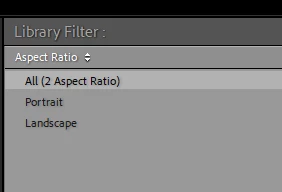
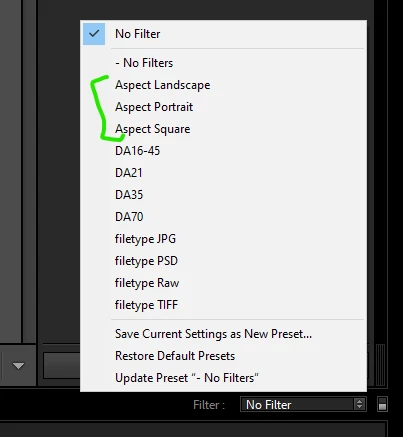
If you want, you can now save out as a named filter for wider use, e.g. "Aspect Portrait". This is done from the drop-down menu at far right end of the Filter bar (top of screen). Thereafter in the drop-down menu at the far right hand end of the Filmstrip (bottom of screen across all modules) you can activate any of these view filters by name, without needing to return to the Library Filter Bar. And you can switch such filtering off again, the same way, as below.
hth
Already have an account? Login
Enter your E-mail address. We'll send you an e-mail with instructions to reset your password.
 AdChoices