
Participating Frequently
August 7, 2017
Answered

How to get borderless printing with LR?

  • August 7, 2017
  • 1 reply
  • 726 views

I used to have no problem printing borderless using Mac 10.11, LR and Pro 100.

Now, when I print borderless I get a sliver of white on the left and the bottom on a landscape orientation print.

I've chosen borderless paper in page set up.

I've chosen Zoom to Fill

The Cell size is maximum

All  the margins in the LR Print module are zero.

What else might I try?

Thanks for your consideration.
    This topic has been closed for replies.
    Correct answer JoeKostoss

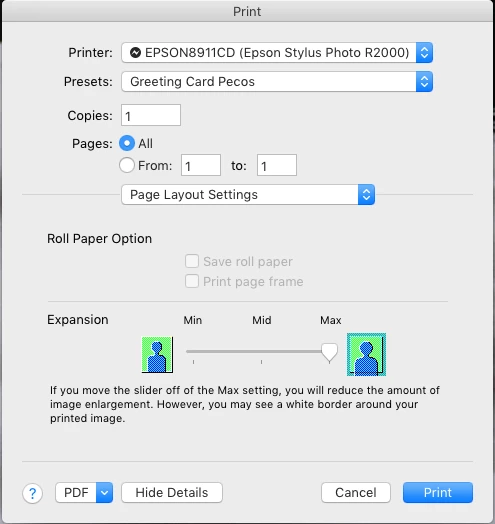
    In the the Print Settings dialog, under Page Layout Settings be sure that Expansion is set to Max.  The white border occurs when Expansion is set to Min and the paper alignment in the printer is not exactly perfect.  The expansion setting causes the print to expand slightly to be larger than the paper, thus eliminating the white sliver of a border.

    1 reply

    JoeKostoss
    Community Expert
    JoeKostossCommunity ExpertCorrect answer
    Community Expert
    August 7, 2017

    In the the Print Settings dialog, under Page Layout Settings be sure that Expansion is set to Max.  The white border occurs when Expansion is set to Min and the paper alignment in the printer is not exactly perfect.  The expansion setting causes the print to expand slightly to be larger than the paper, thus eliminating the white sliver of a border.