
Known Participant
September 21, 2019
Answered

How to get rid of folders

  • September 21, 2019
  • 2 replies
  • 982 views

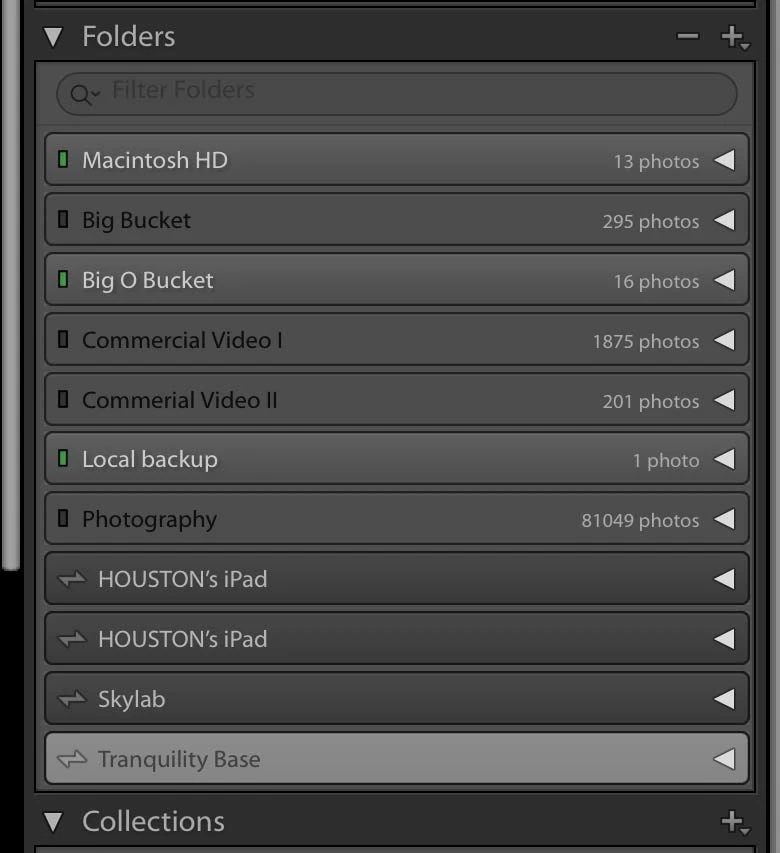
I am sure this is quite simple but perhaps I am searching with the wrong terminology, I don't know so here I am. So the question is how in the world can I get rid of the Folders (drives) that I no longer use in the left panel of Lightroom CC.  Specifically "Commercial Video I & II and a few others. (see attachment). Deperatley need some house cleaning here.
    This topic has been closed for replies.
    Correct answer Geoff the kiwi
    The four drives without the green lights are not connected but have files in the catalog as they show numbers. The bottom ones are Synced devices and will stay until there is no Synced data.

    2 replies

    Known Participant
    September 21, 2019

    I want to remove the drives. I understand what you are saying about removing the files forst and then the drives will disapear but what about the ones that are not even connected. I want those gone. They have no folders in them, the drives simply do not exist.

    Geoff the kiwi
    Community Expert
    Geoff the kiwiCommunity ExpertCorrect answer
    Community Expert
    September 21, 2019
    The four drives without the green lights are not connected but have files in the catalog as they show numbers. The bottom ones are Synced devices and will stay until there is no Synced data.
    Geoff the kiwi
    Community Expert
    Community Expert
    September 21, 2019

    These are Drives, not Folders so which are you wanting to remove?? You will need to remove the Folders and Files in the Drives and then the Drives will not show.