Participant
October 29, 2024
Answered

How to reconnect my Watermark signature presets folder to LRC

  • October 29, 2024
  • 1 reply
  • 510 views

LRC vsn 14.0.1, Mac IOS Sequoia 15.0.1

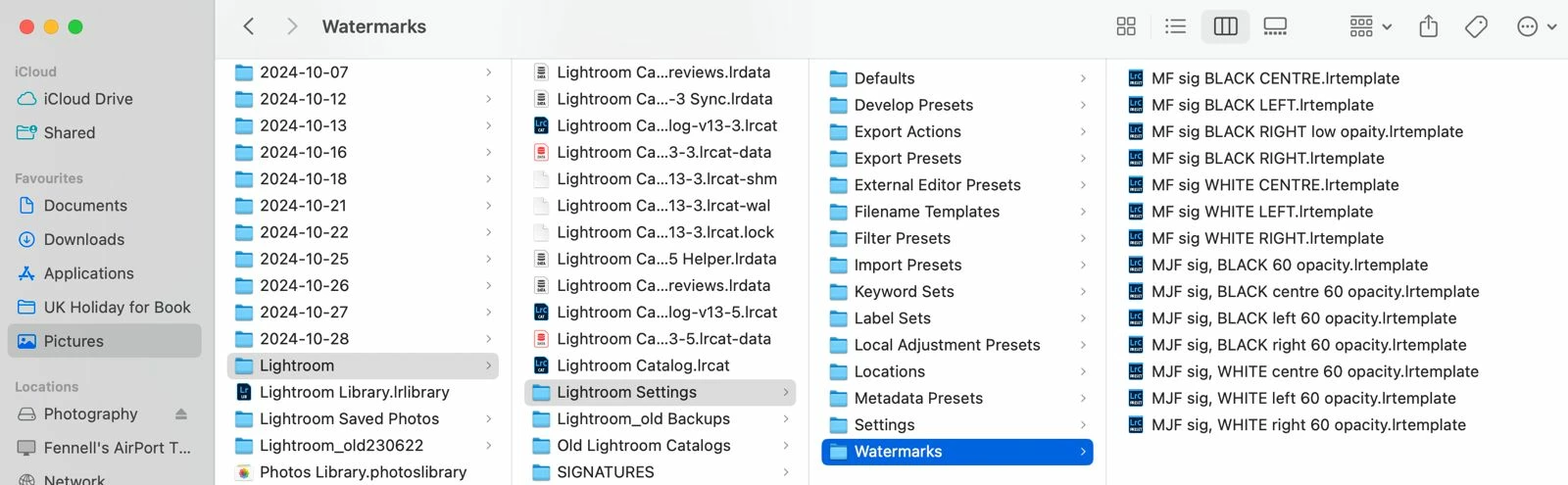
LRC seems to have lost the pointer to my Watermark signature preset folder. Is there a way to reconnect it? I'd really rather not try to recreate all these if at all possible! 

Here is a screenshot of the path...


This topic has been closed for replies.
Correct answer Conrad_C

OK, so the path shown in your screen shot seems to be

~/Pictures/Lightroom/Lightroom Settings/Watermarks


That isn’t the standard location, so we’ll assume the Watermarks folder was copied there for backup or something.


The standard location is 

~/Library/Application Support/Adobe/Lightroom/Watermarks


That’s the Library folder inside your user acccount Home folder, not the Library folder at the root level or in /System.


Also notice that most of your other Lightroom Classic user settings, presets, and templates are also stored in that Lightroom folder.


The user level Library folder is hidden by default, but you can reveal it. In the Finder click the Go menu, and if the Library folder isn’t already listed there, hold down the Option key to reveal the Library command and then choose it from the menu.

1 reply

Conrad_C
Community Expert
Conrad_CCommunity ExpertCorrect answer
Community Expert
October 29, 2024

OK, so the path shown in your screen shot seems to be

~/Pictures/Lightroom/Lightroom Settings/Watermarks


That isn’t the standard location, so we’ll assume the Watermarks folder was copied there for backup or something.


The standard location is 

~/Library/Application Support/Adobe/Lightroom/Watermarks


That’s the Library folder inside your user acccount Home folder, not the Library folder at the root level or in /System.


Also notice that most of your other Lightroom Classic user settings, presets, and templates are also stored in that Lightroom folder.


The user level Library folder is hidden by default, but you can reveal it. In the Finder click the Go menu, and if the Library folder isn’t already listed there, hold down the Option key to reveal the Library command and then choose it from the menu.

Participant
October 30, 2024

Conrad you're a blooming genius! It pays to read and read again - your instructions were blindingly clear but I ignored the key point - Library is HIDDEN! After a few hours creating watermarks and not seeing them in a Watermarks folder I was convinced I'd wasted my time. Net is all is clear now, I learned how to reveal hidden folders, I have my watermarks, and thanks to you, I now know the location path to follow if I'm checking out presets. Thank you Conrad - you're a star!