

snsok
Known Participant
September 10, 2021
Answered

How to search for still images with "voice memo" audio files embedded

  • September 10, 2021
  • 1 reply
  • 1363 views

My Fujifilm X series cameras allow me to record a voice memo that is imported with the image file into Lightroom Classic. It's a separate WAV file that shows up in LR's metadata panel when present.

The entire "audio file" row disappears when there's no audio file.


See attached MacOS Finder  screenshot and screenshot from Library > Metadata.


Is there a way to search metadata for images that have this audio sidecar? I don't see anything in the Metadata Search dropdown for this.


See attached images.
Correct answer Ian Lyons

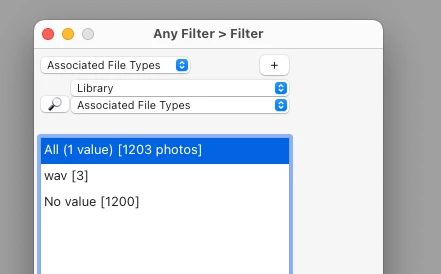
I don't believe there's any built-in method of filtering / searching for images with 'Voice Annotations'. However, the 'Any Filter' plugin by John Ellis https://johnrellis.com/lightroom/anyfilter.htm

 has an option for filtering on 'Wav' files

John is a frequent participant on this forum. So, should be able to explain how it works if you need help.


1 reply

Ian Lyons
Community Expert
Ian LyonsCommunity ExpertCorrect answer
Community Expert
September 10, 2021

I don't believe there's any built-in method of filtering / searching for images with 'Voice Annotations'. However, the 'Any Filter' plugin by John Ellis https://johnrellis.com/lightroom/anyfilter.htm

 has an option for filtering on 'Wav' files

John is a frequent participant on this forum. So, should be able to explain how it works if you need help.


snsok
snsokAuthor
Known Participant
September 11, 2021

@9767695 Wow, that is just perfect! Exactly what I was looking for. I've now located all my images with WAV notes.


Thanks so much. Very appreciated.