


- Home
- Lightroom Classic
- Discussions
- Re: How to stop auto-import when USB inserted (whi...
- Re: How to stop auto-import when USB inserted (whi...
How to stop auto-import when USB inserted (while option has been turned off in settings)

Copy link to clipboard
Copied
Lightroom 7.3.1. keeps opening the import dialog whenever I insert a USB drive into my computer. This "open import" setting has been turned off in Preferences but it opens regardless.
Anyone ideas????


 8
Replies
8
8
Replies
8




Copy link to clipboard
Copied
... and your OS is .. ?
Copy link to clipboard
Copied
My bad, Windows 10

Copy link to clipboard
Copied
If using Mac then try disabling from Image Capture application. I can't help with Windows.
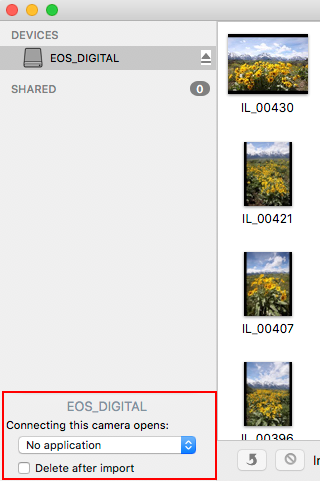
Copy link to clipboard
Copied
It;s Windows 10 - thank you though for replying
Copy link to clipboard
Copied
Take a look here: http://www.thewindowsclub.com/set-autoplay-defaults-windows-10
There you can configure what is done when a memory card is detected.

Copy link to clipboard
Copied
Just a thought - have you looked at the auto play option with USB devices. A dropped down window should open when you plug in a USB device allowing you to choose what action to take. Trying choosing 'Take no action'. See if this works.
If not, right click on your USB device and open Autoplay. It might help!

Copy link to clipboard
Copied
The answer is on the first tab of the preferences (Edit-Preferences). Under Import Options the first checkbox is to "Show import dialog when a memory card is detected". Deselect this option.

Copy link to clipboard
Copied


Find more inspiration, events, and resources on the new Adobe Community
Explore Now
 AdChoices

