Known Participant
July 19, 2023
Answered

How to turn on & off adjustments made in tabs?

  • July 19, 2023
  • 1 reply
  • 253 views

Is there a way to turn on & off the adjustments I've made in certain tabs in the develop module, instead of having to slide each slider back to 0?  For example, I opened up the color calibration tab, made some adjustments and I want  to see the before and after w/ one click, but in order to see the before I have to slide each slider back to 0.


Thanks!
This topic has been closed for replies.
Correct answer Rob_Cullen

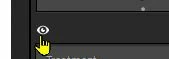
Yes, simply click and hold the mouse cursor on the [eye] icon (that appears on each panel header) which will temporarily remove the panel adjustments from the viewed image.

If you hold down the [Alt/Opt] key the [eye] changes to a [Switch] to allow you to turn the panel adjustments on/off. (Not possible on the Basics panel!)


1 reply

Rob_Cullen
Community Expert
Rob_CullenCommunity ExpertCorrect answer
Community Expert
July 19, 2023

Yes, simply click and hold the mouse cursor on the [eye] icon (that appears on each panel header) which will temporarily remove the panel adjustments from the viewed image.

If you hold down the [Alt/Opt] key the [eye] changes to a [Switch] to allow you to turn the panel adjustments on/off. (Not possible on the Basics panel!)


Regards. My System: Windows-11, Lightroom-Classic 15.1.1, Photoshop 27.3.1, ACR 18.1.1, Lightroom 9.0, Lr-iOS 10.4.0, Bridge 16.0.2 .