
Participating Frequently
October 1, 2023
Question

Huge color difference in LR Develop Tab vs LR Web Tab - please help!

  • October 1, 2023
  • 2 replies
  • 1103 views

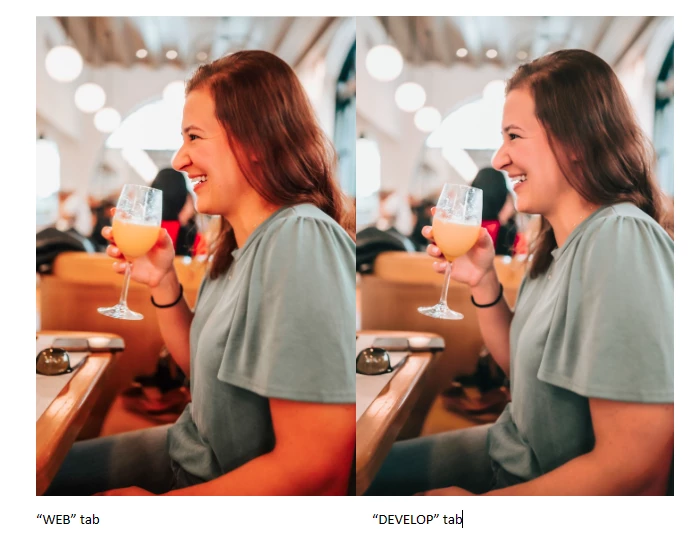
I'm reaching to hopefully get some insight to a recent problem I'm having with LR! I'll finish editing my photos in the Develop tab, switch over to the Web tab (inside LR) and the colors are incredibly off: way too saturated and orange compared to what I see when I'm in Develop. The colors I see in the Web tab of LR are much more similar to what I see in my online gallery hosting site as well as my iPhone, so I think the issue is with the Develop window. I understand there will always be slight variations in how the colors display across different programs, however, why would they be displayed SO differently in the same program?! I then have to go back into Develop and blindly desaturate until it looks acceptable in the Web tab. Any help would be greatly appreciated!!
This topic has been closed for replies.

2 replies

Community Expert
October 1, 2023

A factor only mentioned in passing it seems is the calibration of your display. If you don't calibrate your display using hardware, there might be a monitor profile installed by some driver that is corrupt. This is strangely common on windows machines. You should calibrate your display to see if it fixes things or use the test that @johnrellis lists of setting the display to sRGB. This just tests whether the monitor profile could be the problem, not whether it is. Only real solution in general is to calibrate.

Ania5D7CAuthor
Participating Frequently
October 2, 2023

I just installed the latest driver for the graphics card and there is no difference. As for screen calibration, I don't see why/how that would help considering the colors are different within LR. I had a profile on my monitor that was calibrated but it gave blacks and greys a pink hue, and tbh I couldn't stand it and have just switched to the standard profile. Below is another example of the color difference between the two tabs in Lightroom.

Ania5D7CAuthor
Participating Frequently
October 2, 2023

I'd like to add, that the "web tab" photo is how I actually edited the photo this past June, so I believe the way the color is displaying in the web tab to be accurate. The problem is within the Develop tab.


Now: photos edited to my liking in Develop tab = overly saturated and orange in Web tab

Past photos: colors in Web tab are correct to how I edited them (in the past) = now muddy/muted in Develop tab

johnrellis
Legend
October 1, 2023

There is (or was) a long-standing bug that Adobe has never reported as fixed. The Web module uses (or used) the Chromium Embedded Framework, the web engine inside the Chrome browser.  The version of CEF it uses (or used) assume the display is sRGB, rather than using the display's assigned color profile. So if you're on a wider-gamut display (as most new ones are), the colors in the Web module will look oversaturated.


Most browsers are fully color managed these days, so if you publish the Web gallery and then view it in a color-managed browser, it should look reasonably close to what you see in Develop.


I haven't retested the bug since LR 8 in 2018 -- I think relatively few people use the Web module these days.


Please do the menu command Help > System Info and report the exact version of LR you're running.


Ania5D7CAuthor
Participating Frequently
October 1, 2023

The problem is, the "web tab" photos look like what is displayed on my iPhone and online gallery, not what the "develop tab" photo looks like. I went back photos I edited maybe 2 years ago, the "web tab" photos look exactly how I remember them, how I would've edited them, but the "develop tab" photos look boring, flat, and desaturated. 


Here is my system info:

Lightroom Classic version: 12.5 [ 202308091523-68a7abd6 ]
License: Creative Cloud
Language setting: en
Operating system: Windows 8  - Business Edition
Version: 6.2.9200
Application architecture: x64
System architecture: x64
Logical processor count: 16
Processor speed: 3.5GHz
SqLite Version: 3.36.0
CPU Utilisation: 1.0%
Built-in memory: 32677.3 MB
Dedicated GPU memory used by Lightroom: 1166.0MB / 8081.0MB (14%)
Real memory available to Lightroom: 32677.3 MB
Real memory used by Lightroom: 1843.7 MB (5.6%)
Virtual memory used by Lightroom: 3315.6 MB
GDI objects count: 764
USER objects count: 2790
Process handles count: 2237
Memory cache size: 38.7MB
Internal Camera Raw version: 15.5 [ 1595 ]
Maximum thread count used by Camera Raw: 5
Camera Raw SIMD optimization: SSE2,AVX,AVX2
Camera Raw virtual memory: 228MB / 16338MB (1%)
Camera Raw real memory: 331MB / 32677MB (1%)
System DPI setting: 96 DPI
Desktop composition enabled: Yes
Standard Preview Size: 2560 pixels
Displays: 1) 2560x1440
Input types: Multitouch: No, Integrated touch: No, Integrated pen: No, External touch: No, External pen: No, Keyboard: No
 
Graphics Processor Info: 
DirectX: NVIDIA GeForce GTX 1070 (31.0.15.3623)
Init State: GPU for Export supported by default
User Preference: Auto
 
Application folder: C:\Program Files\Adobe\Adobe Lightroom Classic
Library Path: D:\Ania's Photos\Lightroom\Lightroom Catalog-v12.lrcat
Settings Folder: C:\Users\Ania\AppData\Roaming\Adobe\Lightroom
 
Installed Plugins: 
1) batch.ai
2) Imagenomic Portraiture 3
3) Nikon Tether Plugin
 
Config.lua flags: None
 
Adapter #1: Vendor : 10de
Device : 1b81
Subsystem : 62763842
Revision : a1
Video Memory : 8081
Adapter #2: Vendor : 1414
Device : 8c
Subsystem : 0
Revision : 0
Video Memory : 0
AudioDeviceIOBlockSize: 1024
AudioDeviceName: $$$/dvaaudiodevice/SystemDefaultAndEffectiveDeviceName=System Default - Speakers (High Definition Audio Device)#{comment}DVAAU-4201250: Open the audio hardware preferences page.
AudioDeviceNumberOfChannels: 2
AudioDeviceSampleRate: 48000
Build: LR5x83
Direct2DEnabled: false
GL_ACCUM_ALPHA_BITS: 16
GL_ACCUM_BLUE_BITS: 16
GL_ACCUM_GREEN_BITS: 16
GL_ACCUM_RED_BITS: 16
GL_ALPHA_BITS: 0
GL_BLUE_BITS: 8
GL_DEPTH_BITS: 24
GL_GREEN_BITS: 8
GL_MAX_3D_TEXTURE_SIZE: 16384
GL_MAX_TEXTURE_SIZE: 32768
GL_MAX_TEXTURE_UNITS: 4
GL_MAX_VIEWPORT_DIMS: 32768,32768
GL_RED_BITS: 8
GL_RENDERER: NVIDIA GeForce GTX 1070/PCIe/SSE2
GL_SHADING_LANGUAGE_VERSION: 4.60 NVIDIA
GL_STENCIL_BITS: 8
GL_VENDOR: NVIDIA Corporation
GL_VERSION: 4.6.0 NVIDIA 536.23
GPUDeviceEnabled: false
OGLEnabled: true
 
I erased whatever comes after this, hopefully this is all you need to see. 
 
Thank you for your time and assistance!
Ania5D7CAuthor
Participating Frequently
October 1, 2023


Operating system: Windows 8  - Business Edition


Is that correctly identified? Surprised LrC v12 runs on that if true. LrC could be reporting that falsely.

https://helpx.adobe.com/lightroom-classic/system-requirements.html

ahh

DirectX: NVIDIA GeForce GTX 1070 (31.0.15.3623)

V536.23, That would  not be a driver for Windows 8. v477.44 would be the latest for Windows 8. Now for Windows 10 or 11, the current would be v537.42


Can you ELI5?