

victoriajourneyzing
Inspiring
April 8, 2023
Answered

I am in LRC in Library and on the R side is a whole batch of Metadata

  • April 8, 2023
  • 1 reply
  • 203 views

But it contains things I really don't care about - at least in this initial review - such as GPS, Country, etc == How can I trim the Metadata view on the R side so it doesn't take over everything = I want to see Keywords but don't need all the metadata at least until I want/need it.    For instance I can't Keyword images and then go below to put in titles or Captions wihtout doing so separately and with alot of scrolling.
This topic has been closed for replies.
Correct answer Ian Lyons

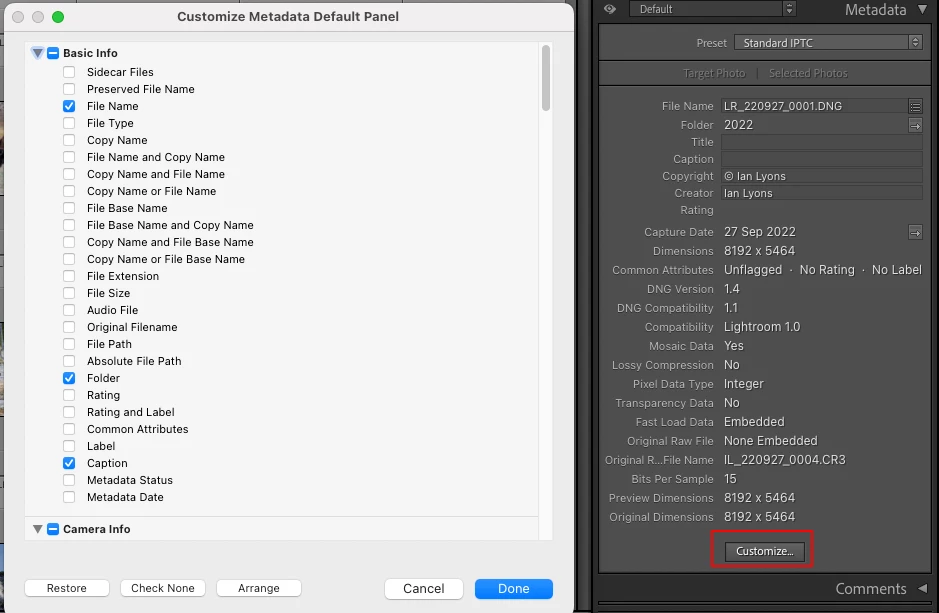
You can customise the Default panel by clicking on the button at bottom of panel as shoen in attached screenshot.


1 reply

Ian Lyons
Community Expert
Ian LyonsCommunity ExpertCorrect answer
Community Expert
April 8, 2023

You can customise the Default panel by clicking on the button at bottom of panel as shoen in attached screenshot.


victoriajourneyzing
Inspiring
April 8, 2023

THANK YOU SO MUCH - am still trying to get used to LRC [years of Aperture use spoiled me] and knew there was a way, just not how to do it.

Ian Lyons
Community Expert
Community Expert
April 8, 2023

If new to Lightroom Classic, then I recommend you checkout the video tutorials produced by Julieanne Kost (Adobe Evangelist) at this link https://jkost.com/blog/lightroom-training-videos


You'll find lost of other videos via a Google search, although best you includ 'Classic' in the search line'.