Known Participant
July 23, 2024
Answered

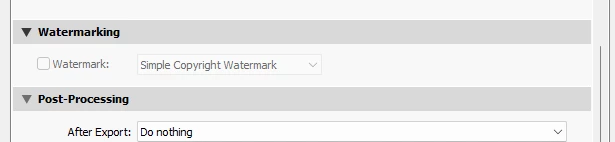
I can not select the watermark during export??

  • July 23, 2024
  • 3 replies
  • 341 views

I can not select the watermark during export??  They are there, but it is not highlighted to select. I can go into and edit the watermarks so I know they are there but during export I no longer have an option to use it.  I have the latest update and everything else seems to be working ok. I am at a loss! 
This topic has been closed for replies.
Correct answer Rob_Cullen

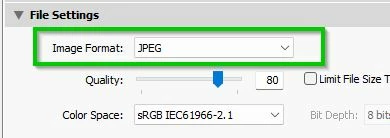
@misty66  The question from @AxelMatt  remains- What Format are you trying to Export?

DNG and Original (from a raw) do not allow watermarking. The WM option is greyed out with either of these two formats selected.

Choose JPG, TIF, PSD instead.


3 replies

Rob_Cullen
Community Expert
Rob_CullenCommunity ExpertCorrect answer
Community Expert
July 23, 2024

@misty66  The question from @AxelMatt  remains- What Format are you trying to Export?

DNG and Original (from a raw) do not allow watermarking. The WM option is greyed out with either of these two formats selected.

Choose JPG, TIF, PSD instead.


Regards. My System: Windows-11, Lightroom-Classic 15.1.1, Photoshop 27.3.1, ACR 18.1.1, Lightroom 9.0, Lr-iOS 10.4.0, Bridge 16.0.2 .
GoldingD
Legend
July 23, 2024

And if you click on Watermark, does it behave?


AxelMatt
Community Expert
Community Expert
July 23, 2024

@GoldingD As far as I see in the screenshot the check box "Watermark" is greyed out and not cklickable.


My System: Intel i7-8700K - 64GB RAM - NVidia Geforce RTX 3060 - Windows 11 Pro 25H2 -- LR-Classic 15 - Photoshop 27 - Nik Collection 8 - PureRAW 5 - Topaz Photo
AxelMatt
Community Expert
Community Expert
July 23, 2024

In which format to you try to export?

See also here: Gelöst: Can't select watermark for export - Adobe Community - 10434678


My System: Intel i7-8700K - 64GB RAM - NVidia Geforce RTX 3060 - Windows 11 Pro 25H2 -- LR-Classic 15 - Photoshop 27 - Nik Collection 8 - PureRAW 5 - Topaz Photo