
Inspiring
April 30, 2020
Question

I can see photos to leete but LR cannot !!???

  • April 30, 2020
  • 5 replies
  • 1165 views

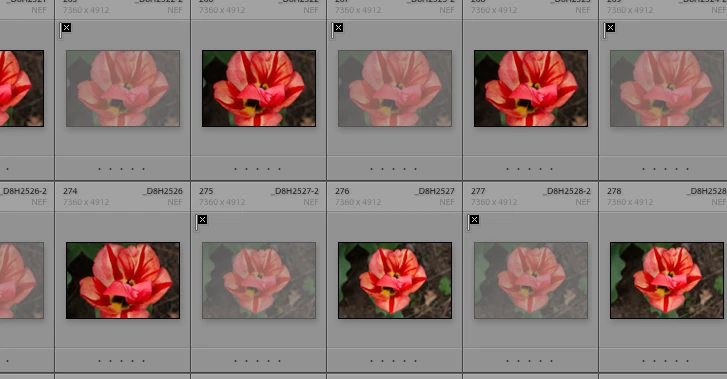
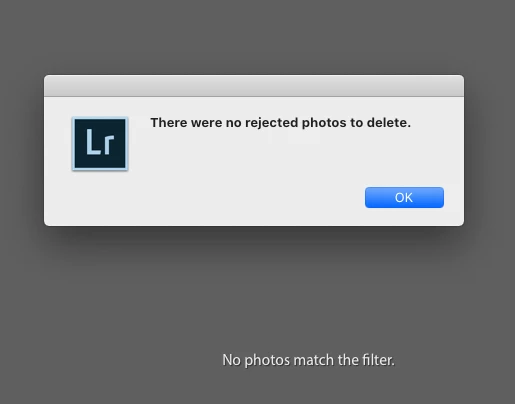
How do I make sense of this?  After years of doing this,  SUDDENLY something is wrong?:

As you can see there ARE photos to delete.  As LR cannot see, there are no photos to delete?

LR 9.2

osx 10.15.3

hmm, not all flagged photos show up either.
This topic has been closed for replies.

5 replies

Bob Somrak
Legend
May 4, 2020

A restart doesn't actually FIX the issue permanantly.


As an example,

1 Go to a Folder of 3 photos that are UNEDITED

2 Mark one as Rejected.

3 Click the Edited Filter icon in the filter bar.  All the photos will disappear. 

4 Use the Switch or Filters Off preset to turn the filter off.  All the photos will come back.

5 Use the Delete Rejected Photos (Your error happens,  this is what your screen clips show) The Edited Filter icon doesnt get shut off.


M4 Pro Mac Mini. 48GB
Bob Somrak
Legend
May 1, 2020

You do not need to reset Preferences.  This is a bug in the Lightroom "Filters Off" preset or the switch with filters set that is causing an issue with the "Delete Rejected Photos" .  You will notice in your TOP screen clip you have the "Filters Off" preset selected but the "Doesnt have edits" filter is still highlighted.  The photos display like there is no filter but it trips up "Delete Rejected Photos". I can duplicate your scenario if I use the Filters Off preset.  The Issue goes away if I use my self created "All Filters Off" filter.  I posted this in another thread I can't find but Adobe hasnt fixed it yet.  I didnt realize it affected the "Delete rejected photos" command which is more serious than I originally thought.


M4 Pro Mac Mini. 48GB
Inspiring
May 4, 2020

Now LR behaves as normal.  Restart fixes this?

Rob_Cullen
Community Expert
Community Expert
May 1, 2020

Definitely something is 'wrong' with Steve_Ze's Lightroom!

(These are NOT virtual copies)

The error messages that show- "There were no rejected....." and "No photos match the filter" are the messages that I do see when I know that there are NO images marked as 'rejected' and use the [Ctrl+Backspace] shortcut.

Yet the OP does have Rejected photos!

Has a reset of the Preferences file been tried?  Preferences Reset 

Bob- just beat me with the Reset suggestion 🙂


Regards. My System: Windows-11, Lightroom-Classic 15.1.1, Photoshop 27.3.1, ACR 18.1.1, Lightroom 9.0, Lr-iOS 10.4.0, Bridge 16.0.2 .
Bob Somrak
Legend
April 30, 2020

You have a filter set that shows no photos.  The Delete Rejected Photos command respects the filter.  Turn the filter off.

M4 Pro Mac Mini. 48GB
Inspiring
April 30, 2020

Filters are off and NO GO


Bob Somrak
Legend
May 1, 2020

The dialog says "No photos matches the filter".  Maybe its time for a Preference reset.

M4 Pro Mac Mini. 48GB
Participant
April 30, 2020

They are virtual copies, you can delete them from the catalog, but if you mark these copies to discard you cannot delete them. "Discard" makes sense when you've imported and want to delete your worst photos.

Inspiring
April 30, 2020

The Camera has dual cards, programmed for duplicate captures.

When I accidnetally import all the phots, I have to dump

the "-2"'s.  I search the -2's, X trhem, and delete.  But not today.

Other X's dont delete  either.

Participant
April 30, 2020

I just created a virtual copy of a photograph. I marked it "X" to reject it. And I get to eliminate it (Ctrl+X). It's rare.