
KarinaGMendez
Participant
June 17, 2019
Question

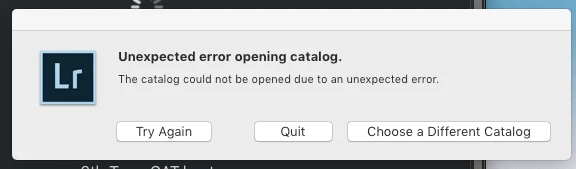
I keep getting "Unexpected error opening catalog" in Mac

  • June 17, 2019
  • 5 replies
  • 313 views

Hello people,

I have multiple CAT files, yet lately I've noticed that I've been getting the "Unexpected error opening catalog" message with my two most recent ones.  I've tried opening the catalogs in LR v8.3.1, v8.2.1 and v6.0 and I still get the same result.  I'm running MacOS Mojave (10.14.5), but I've also tried opening it in Windows 10 and I get the same exact error.  I've made sure all my files have read/write permissions and still no go.

I read somewhere that this could mean a bad sector in the my drive, but it's strange that it happened twice and in two different catalog files.  Also, my SSD is new, so it seems unlikely.

Any help would be great.

Thank you so much!

Karina
This topic has been closed for replies.

5 replies

KarinaGMendez
Participant
June 17, 2019

Hey guys,

Thank you for all the suggestions.  I'm embarrassed to admit that it was a big mistake of mine.  I work with both lightroom and photoshop at the same time.  After I make the changes in LR, I open specific files in PS and make granular tweaks, then save to TIFF.  In one of those saves, I accidentally clicked the lrcat file, overwriting the CAT file with my TIF data.  That was it. lol.

Sincerely appreciate all the suggestions.

Thank you!

Karina

GoldingD
Legend
June 17, 2019

Ok, you may want to go to your final reply, click on the action button, and tell it that discussion is answered correctly (or is that assumed correct) that way it will show up green as in answered.

GoldingD
Legend
June 17, 2019

One thing to try, many might do this at backup, some think you can only do this at backup, this being check integrity.

Their is a keyboard method of starting lightroom so that it asks you what catalog to open, I keep forgetting what it is, perhaps holding down ALT while clicking on the LR classic icon. Alternately, in LR, in /preferences/general/default catalog/prompt (might be a bit off on that, communicating via ipad)

At any rate when you receive the pop up prompting for what catalog to open, you can click in a box for an integrity check.

P.S. I think it was over at Killer Lightroom tips, where it was advised to NOT accomplish an integrity check during a backup, as if the integrity check actually makes things worse, it just happily continues on and backup the damaged catalog.

GoldingD
Legend
June 17, 2019

And a possible diagnostic, open Lightroom as an administrator,

GoldingD
Legend
June 17, 2019

Several possible causes, several possible remedy’s

one: https://www.lightroomqueen.com/catalog-corruption-cause-prevention/

GoldingD
Legend
June 17, 2019

Are the catalogs failing in Window OS, older copies, or copies from the MAC OS after the failure?

KarinaGMendez
Participant
June 17, 2019

I'm able to open other older CAT files, but 2 of the newest ones I've made are failing. almost like they are getting corrupted.

GoldingD
Legend
June 17, 2019

Have you tried creating a new catalog, then importing from the apparently corrupt catalog.