
Known Participant
October 14, 2023
Question

I need to move my directory (folder) up on my hard drive

  • October 14, 2023
  • 4 replies
  • 583 views

When I started my directory of files on my hard drive I don't know how it was buried 4 layers deep.  I don't know how I did this. 

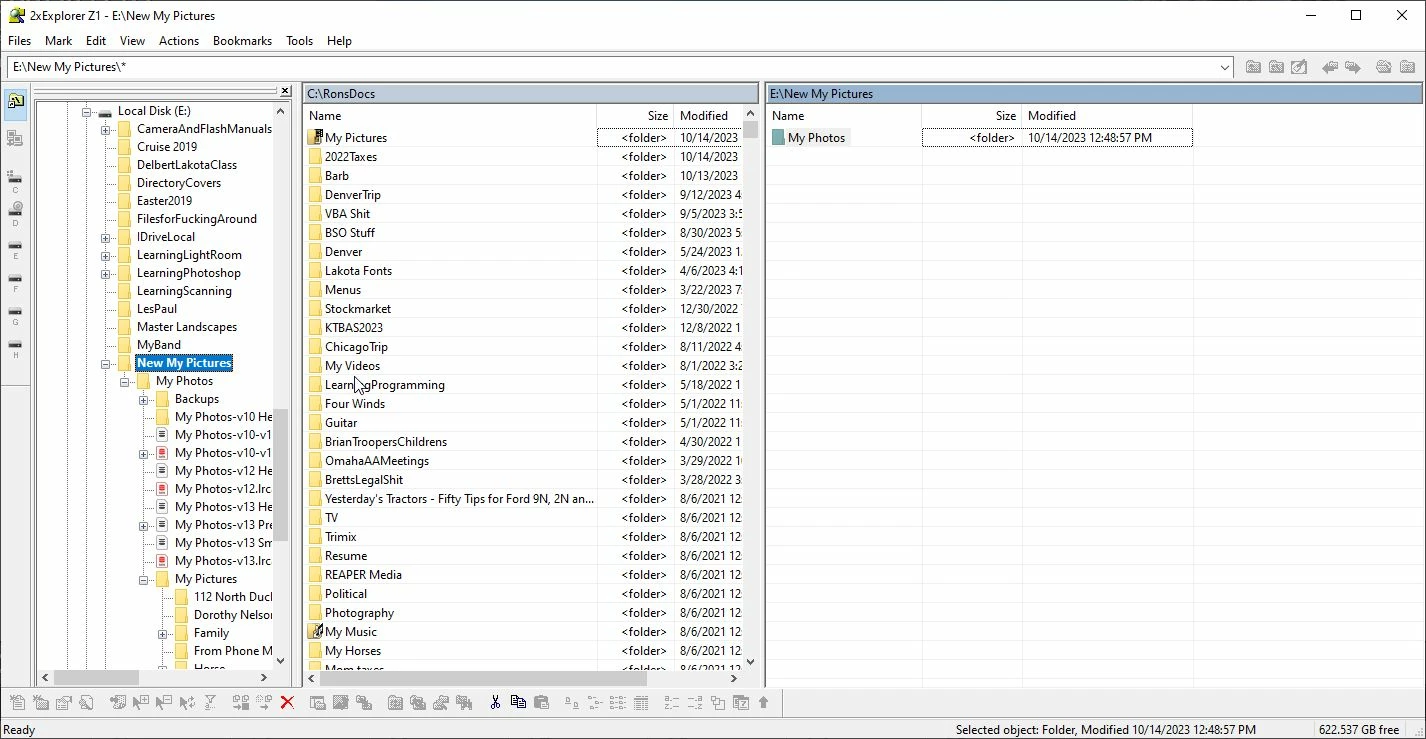
E:\NewMyPhotos\MyPhotos\My Pictures\

But for years whenever I go to it, with Explorer, I have to go that deep to find files.  It's a pain and I don't know why I have put up with it this long.  I want to move the directory with all my files to the top layer.  Hpw do I do that without messing up my catalog?

the catalog is "My Photos-v13.lrcat is in "MyPhotos" directory 3rd layer deep.  I should move it up probably as well. This shows my current directory structure.  You can see it off to left.
 

This topic has been closed for replies.

4 replies

Known Participant
October 19, 2023

@KR Seals @Per Berntsen @dj_paige  Thanks again for replies and attempt to help this dummy.  I'm going out of town for a few days to visit my son.  I haven't had a chance to try your suggestions but please don't take my absence as my giving up or disinterest.  I will be back to you next week.


Thanks again.

Known Participant
October 16, 2023

Thank you @KR Seals @dj_paige and @Per Berntsen .  I'm going to study your replies and decide how to proceed with this.  I appreciate your taking the time to respond and try to help me.  It is appreciated.

Per Berntsen
Community Expert
Community Expert
October 14, 2023

Although the procedure suggested by @KR Seals  is correct,  there have been reports in the past of files disappearing when using LrC to move a large number of files.

To be on the safe side, I would use the File explorer to move the My pictures folder to E:

Then reconnect the folder in LrC – right click it and navigate to the new location.


There is no need to move the catalog folder, but I notice that you have backups in the same folder.

Backups should for safety reasons be on a different drive than the catalog.

dj_paige
Legend
October 14, 2023

Agreeing with @Per Berntsen , do the move in your operating system and reconnect. Instructions for reconnecting are here: www.computer-darkroom.com/lr2_find_folder/find-folder.htm

KR Seals
Community Expert
Community Expert
October 14, 2023

In Lightroom Classic (and only in Lightroom Classic) in the Library Module, folders list, you can click on the folder and drag it up to the E: drive and and LrC will move it for you while keeping track of the photos. Doing this in Windows Explorer will cause LrC to loose track of the files location.


Ken Seals - Nikon Z 9, Z 8, 14mm-800mm. Computer Win 11 Pro, I7-14700K, 64GB, RTX3070TI. Travel machine: 2021 MacBook Pro M1 MAX 64GB. All Adobe apps.