Participant
August 22, 2017
Answered

iMac Lightroom CC

  • August 22, 2017
  • 2 replies
  • 341 views

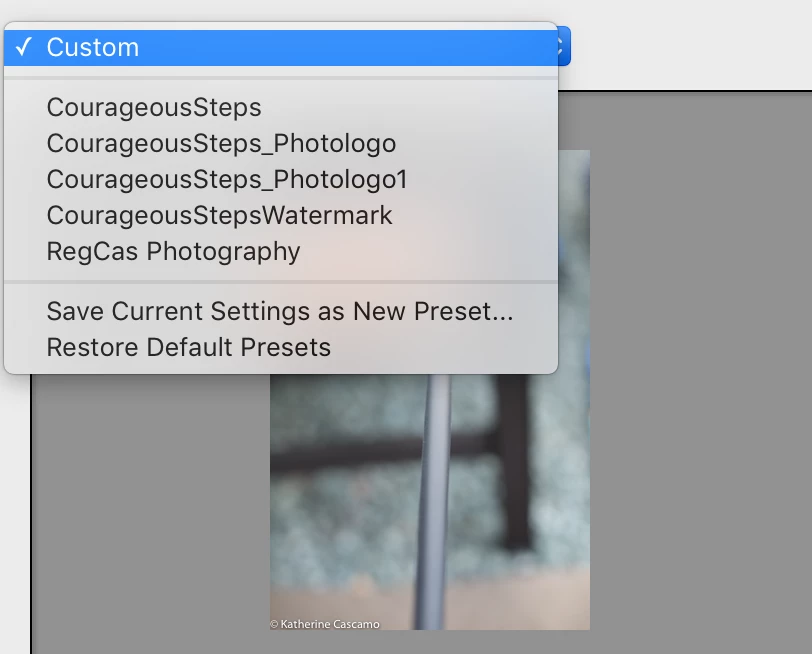
I have reviewed all of the different tutorials for removing a Watermark from the list of watermarks that I have created (in order to upload and create new ones).  Every tutorial shows "delete watermark" but this does not exist in my application.  I have looked, multiple times.  I just deleted the first round of watermarks a month or two ago and I cannot recall how I did it.  I am terribly frustrated

Please advise. 

Katie

    This topic has been closed for replies.
    Correct answer JoeKostoss

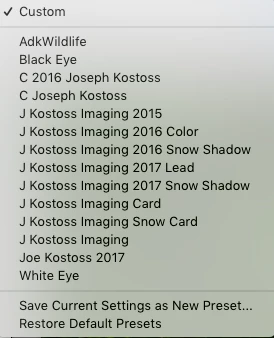
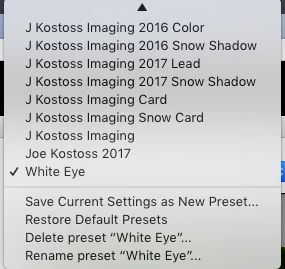
    Select the watermark that you want to delete in your menu above.  In my example I selected White Eye.

    Then get the same drop down menu again

    You can now delete that watermark.

    2 replies

    JoeKostoss
    Community Expert
    JoeKostossCommunity ExpertCorrect answer
    Community Expert
    August 22, 2017

    Select the watermark that you want to delete in your menu above.  In my example I selected White Eye.

    Then get the same drop down menu again

    You can now delete that watermark.

    Participant
    August 23, 2017

    Thank you for impeccably clear instructions! All done! Now…to upload my PhotoLogo!

    Thank you

    -Katie

    Theresa J
    Community Expert
    Community Expert
    August 22, 2017

    In the top menu, go to Lightroom, Edit Watermarks....

    Chose a watermark preset from the dropdown menu in upper left of the watermark editor panel.

    Now go back to the same dropdown and chose the delete option from the bottom of the menu.