
Participant
June 20, 2024
Answered

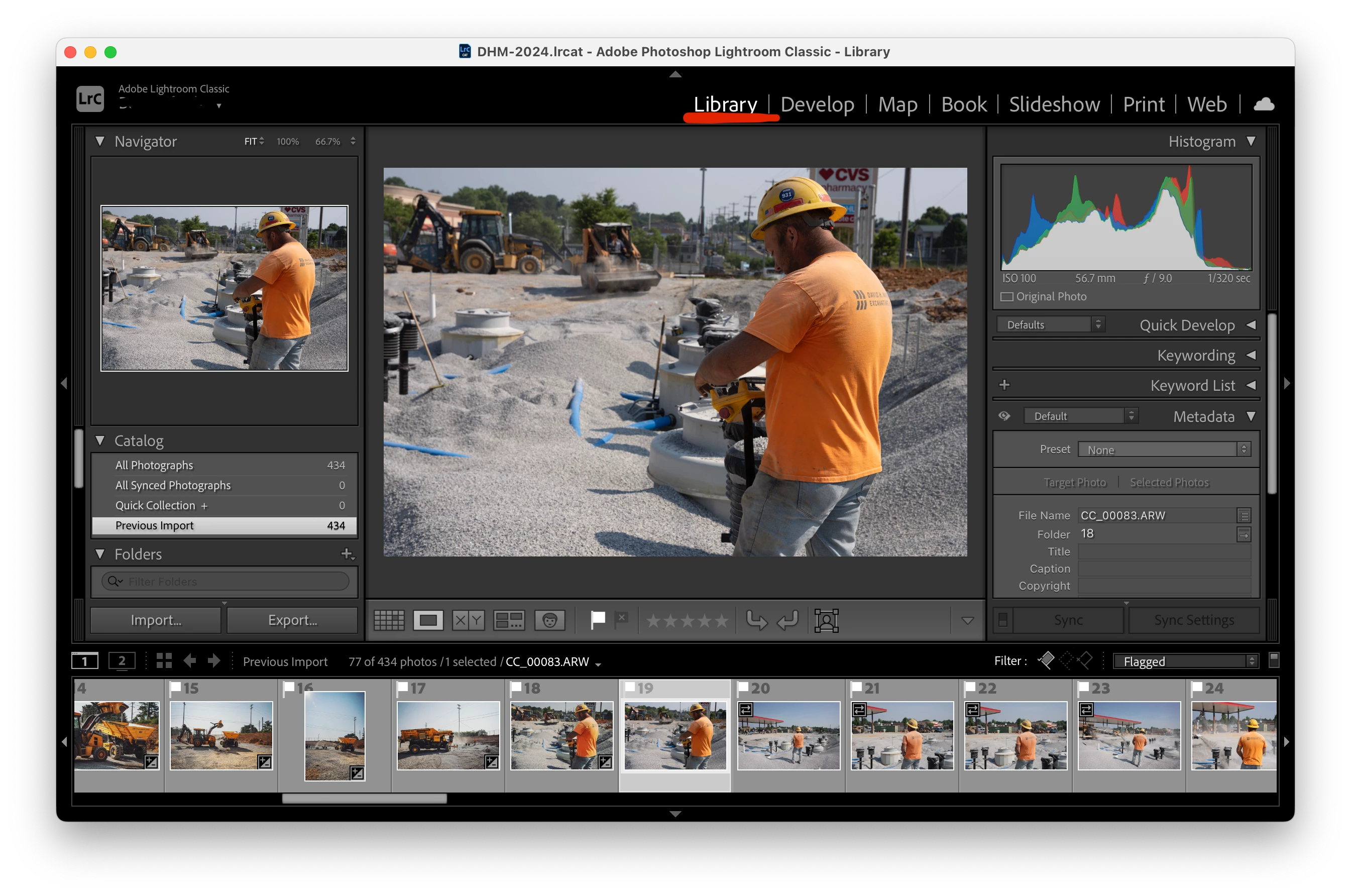
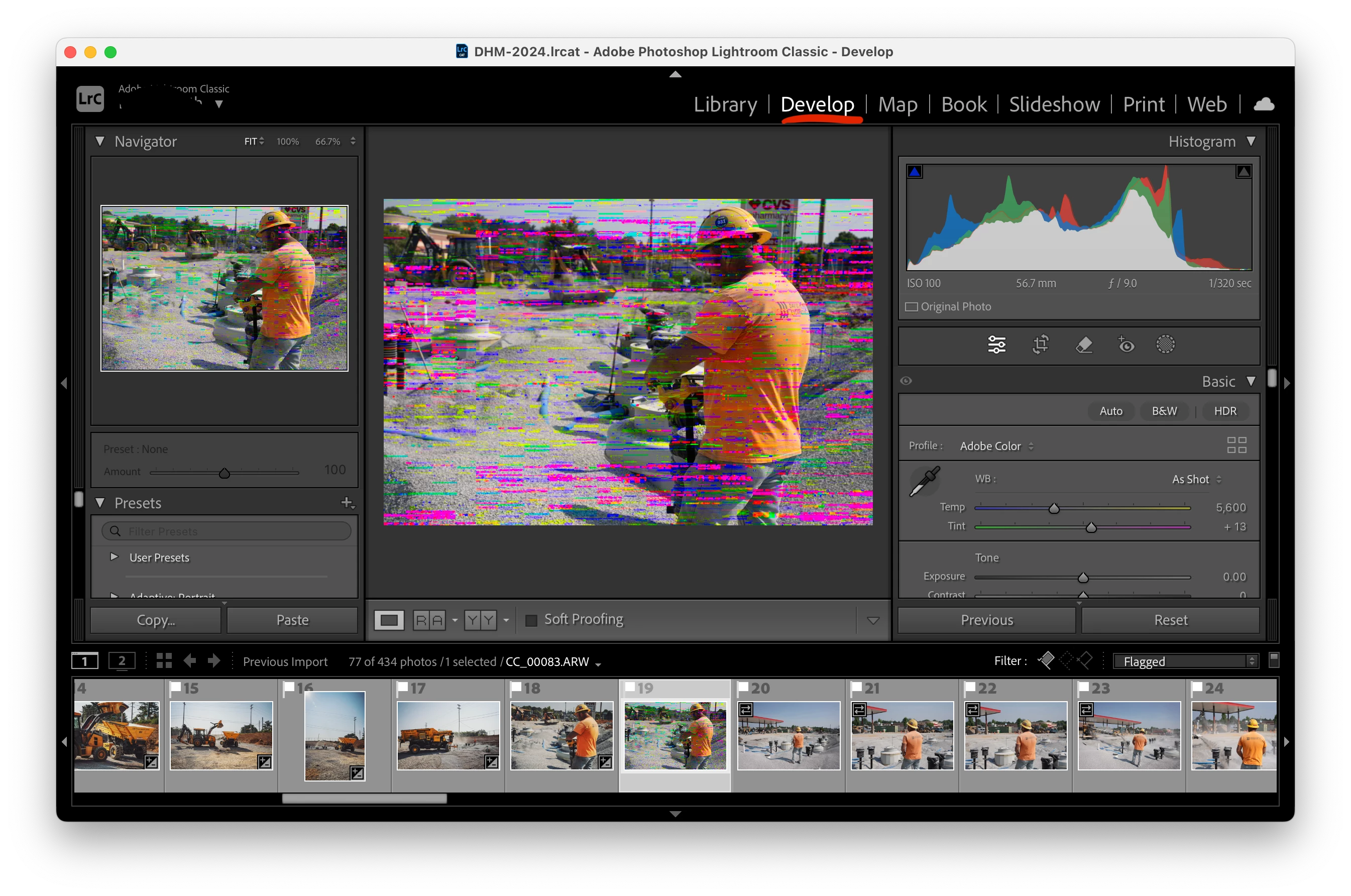
Image in Library view is normal, in Develop its corrupted

  • June 20, 2024
  • 2 replies
  • 1276 views

As I have been using Lightoom Classic v13.3.1 Build [202405311538-6d7c0308] on MacOS Sonoma 14.5 (23F79) images have been artifacting and corrupting in Develop mode as I work. The original file is untouched but all of my develop settings are ruined and I cannot even export a clean image. This issue has happened sporadically and I cannot seems to figure out why it's happening. I'm not sure if it is a preview issue, a caching issue (I've cleared my cache and restarted), or anything else.  I have even tried undoing all my edits to see if it "repairs" the artifacting/issues. Nothing works. Also, if I move along and try to work on more photos every photo I attempt to edit corrupts like this.
  

This topic has been closed for replies.
Correct answer AxelMatt

Please try to switch off the GPU support from the Lightroom preferences and check if that helps to fix the issue. Go to Lightroom > Preferences > Performance tab > Uncheck "Use Graphics Processor" > Restart Lightroom.

https://helpx.adobe.com/lightroom-classic/kb/troubleshoot-gpu.html


Another step is to try to reset the Lightroom preferences.

https://www.lightroomqueen.com/how-do-i-reset-lightrooms-preferences/

It's recommended to backup your preferences before you reset the preferences to the default settings:

https://helpx.adobe.com/lightroom-classic/kb/preference-file-and-other-file-locations.html


If this doesn't help, please provide also a copy of your 'System Info'. This can be get from the LrC Help > System Info menu item. There's a copy button in the System Info dialog. Press this button and paste the info into your next forum post.


2 replies

Ian Lyons
Community Expert
Community Expert
June 20, 2024
AxelMatt
Community Expert
AxelMattCommunity ExpertCorrect answer
Community Expert
June 20, 2024

Please try to switch off the GPU support from the Lightroom preferences and check if that helps to fix the issue. Go to Lightroom > Preferences > Performance tab > Uncheck "Use Graphics Processor" > Restart Lightroom.

https://helpx.adobe.com/lightroom-classic/kb/troubleshoot-gpu.html


Another step is to try to reset the Lightroom preferences.

https://www.lightroomqueen.com/how-do-i-reset-lightrooms-preferences/

It's recommended to backup your preferences before you reset the preferences to the default settings:

https://helpx.adobe.com/lightroom-classic/kb/preference-file-and-other-file-locations.html


If this doesn't help, please provide also a copy of your 'System Info'. This can be get from the LrC Help > System Info menu item. There's a copy button in the System Info dialog. Press this button and paste the info into your next forum post.


My System: Intel i7-8700K - 64GB RAM - NVidia Geforce RTX 3060 - Windows 11 Pro 25H2 -- LR-Classic 15 - Photoshop 27 - Nik Collection 8 - PureRAW 5 - Topaz Photo